Why Apple keeps rejecting your app under Guideline 4.3 and 2.1
App Store rejection recovery for indie iOS teams: why 4.3 and 2.1 rejections repeat, and the build-specific cause most teams miss.
You resubmit, and the same rejection comes back a third time with a slightly different guideline number on it. App Store rejection recovery is mostly that loop, and the reason a rejected iOS app keeps getting rejected again is rarely the reason printed in the Resolution Center.
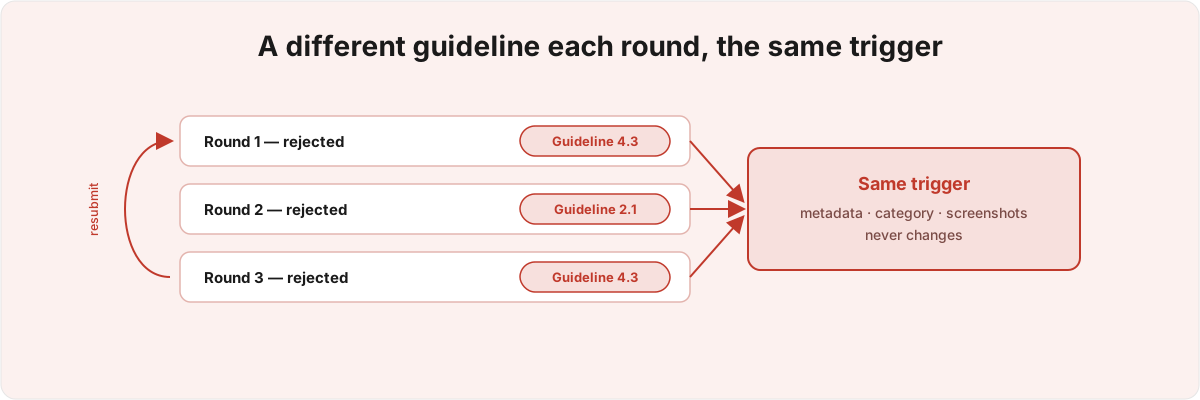
The guideline cited is the label App Review settles on. What triggered it sits in your build, your metadata, or the two minutes the reviewer spent inside your app. Find that and you stop resubmitting into the same wall.
Why does my iOS app keep getting rejected for the same thing? 
Because the words on the rejection are not the cause. You rewrite to satisfy the guideline text, a second reviewer hits the same icon, screenshots, and dead demo account, and reaches for the same label. The number on the rejection changes between rounds; the thing underneath it does not.
This misreading is structural rather than careless. The Resolution Center message classifies your build; it does not diagnose it. A reviewer spends a few minutes with your build, forms an impression, and picks the guideline that best fits it from a finite menu. Two reviewers looking at the same unchanged surface will often pick two different guidelines for the same underlying reason, which is why round one comes back as 4.3, round two as 2.1, round three as 4.3 again. You read three problems. There was one, and it never moved.
So the first job is to ignore the guideline text and read the history as a single signal. Three rounds citing three numbers, but every round triggered inside the first thirty seconds the reviewer spent in the app, means the binary is fine and the problem is presentation. Three rounds on the same number, each after the reviewer got several screens deep, means the problem is behavioural. Any single round misleads you about which it is.
What does a Guideline 4.3 rejection actually mean? 
A 4.3 rejection reads like an accusation of spam, so teams answer by arguing they are not spam. That misreads the clause. It fires when a reviewer pattern-matches your app against a saturated category, and the match happens on surface signals: your icon, your screenshots, the first line of your description, the keyword field most of your team never opens.
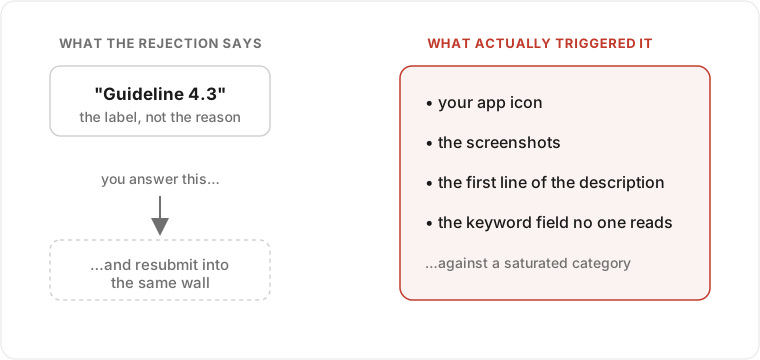
The precision here is the whole fix. Guideline 4.3 is the "Spam" clause, aimed at apps that are duplicative or flood a category with minor variations.[1]1. App Store Review Guidelines, Guideline 4.3 ("Spam"), which targets duplicate and minimally-differentiated apps and saturated categories - see Apple's published App Store Review Guidelines, section 4.3. App Review runs its similarity check not against your source but against everything a shopper sees before they download: the product page. So the comparison set is apps that share your icon palette, your screenshots, your category, and your metadata, regardless of what your code does. An original app with a generic product page lands in the same bucket as a reskin farm, because from the only vantage point App Review uses, they are indistinguishable.
I hit a version of this with my own intimacy tracker, Silk . The same on-device journal, unchanged, got a 16+ rating with no images, no feed, no links in the build, on the subject matter of the metadata alone. The build never moved between submissions; the words in a metadata field did. I swapped one field at a time and watched the classification move, and wrote it up in Apple's Problem with Bodies. The lesson generalises past sensitive categories: the classifier reads your surface, so you can change its answer by editing metadata rather than code.
The iOS 27 changes widen this. The new Product Page Header and custom Search Results visuals, both introduced for iOS and iPadOS 27, expand the set of approved assets a reviewer and the ranking system see, and assets in the Asset Library can swap onto the live header without re-review[2]2. WWDC 2026, session 205, "Enhance your presence on the App Store" - Product Page Header and custom Search Results visuals for iOS/iPadOS 27, with approved Asset Library assets swapping onto the live header without re-review., which adds more surface to pattern-match against and more places a 4.3 trigger can hide. So a 4.3 has to be diagnosed against your real product-page assets and metadata, because that is where the signal lives. Answer the word "spam" instead and your next build trips the same surface check the icon and screenshots tripped before.
Why does Apple keep asking for "Information Needed" under Guideline 2.1? 
Guideline 2.1 is the opposite failure. It is Performance and Accuracy, and most of the time it means the reviewer could not get something to work.[3]3. App Store Review Guidelines, Guideline 2.1 ("App Completeness" / Performance - Accuracy), the clause App Review cites when a build, demo account, or backend cannot be exercised during review. The demo account locked after one login, the feature sat behind a paywall they never reached, the server was asleep during their pass. So you ship a new binary, and the thing that blocked the reviewer was never in the binary to begin with.
What makes 2.1 nastier than 4.3 is that it usually arrives as a question. The "Information Needed" reply runs against the same thread, often the same reviewer, so the wrong first answer turns a same-week approval into weeks of back-and-forth, and the right answer depends on what that one reviewer could not see, reconstructed from a deliberately vague prompt. Three failure shapes account for most of these loops, identical in the Resolution Center but needing different responses. Access: a demo account that single-uses, an SMS code the reviewer can't receive, a region lock, a feature behind a real-money purchase. Reachability: the feature works, but it is four taps deep behind an onboarding flow the reviewer abandoned. Liveness: a backend that cold-starts, rate-limits an unfamiliar IP, or times out, so the app looks broken on a good build. Access gets fixed in the credentials and notes, reachability with a deep link or walkthrough video, liveness in your infrastructure. Fix the wrong layer and the same "Information Needed" comes back.
The liveness case is the one teams refuse to believe, because the app works on every device they own. App Review tests from their own network on their own schedule, and a backend exercised only by warm traffic from your team behaves differently under a cold, geographically distant first request. If your demo path touches a server, the question to ask is whether the feature works on a first request from somewhere you've never tested, which is a different thing from whether it works at all. For regulated apps the stakes climb: a 2.1 stall on a HealthKit or medical feature often sits next to a privacy-string or entitlement issue you don't want to trip while clearing the first one.
Why do the guideline numbers change between rounds if the cause is the same? 
Because each reviewer independently classifies an unchanged surface, and the classification has slack. The cause stays fixed while the label stamped on it varies. App Review is a queue of people, each picking within minutes from an overlapping set of guidelines where more than one number fits the same observation, so the variance across rounds is variance between reviewers rather than a second bug you uncovered by fixing the first.
That makes the history, not the latest message, the unit of diagnosis. The first thing I ask for in a rejection case is every round, in order, with timestamps and full reviewer text. The shape is the diagnostic: which guidelines, in which order, and how far into the app each rejection happened. Early-exit rejections under rotating numbers point to a presentation problem; rejections that land several screens deep under one stable number point to a behavioural defect. You don't trust one stack trace when something fails non-deterministically - you look for the invariant across many, the way I treat a flaky state machine that misbehaves only at the edges.
How do I actually get out of the rejection loop? 
You break the loop by diagnosing once, correctly, instead of resubmitting and hoping, and the correct move is unintuitive every time. For a 4.3, the instinct is to change the app, when the fix is in the product page. For a 2.1, the instinct is to ship a new binary, when the fix is in the demo account, the review notes, or the backend. For a number that keeps changing, the instinct is to treat each round as new, when the fix is to treat them as one. Each one inverts the natural response, which is how a careful team shipping clean builds spends three weeks in a loop that a correct first read would have closed in a single round.
I have shipped twelve-plus apps across consumer, regulated medical, and intimate-wellness categories, several Featured by Apple, including an FDA-regulated epilepsy app that holds a 4.9/5 rating,[4]4. Epsy, an FDA-regulated epilepsy management app I worked on for five years at LivaNova, shipping HealthKit and Apple Watch support; it holds a 4.9/5 App Store rating and received a CES Innovation Award. and the loop is almost always shorter than it feels once you stop answering the label. What the trigger is, and which layer it lives in, is specific to your build, your metadata, and what one reviewer could or couldn't see. If you are stuck and the review clock is running, send me the rejection history and current metadata and I will read it for the signal your resubmissions keep missing - including whether it sits next to a security or privacy issue, which 2.1 stalls often do.
App Store Review Guidelines, Guideline 4.3 ("Spam"), which targets duplicate and minimally-differentiated apps and saturated categories - see Apple's published App Store Review Guidelines, section 4.3. ↩︎
WWDC 2026, session 205, "Enhance your presence on the App Store" - Product Page Header and custom Search Results visuals for iOS/iPadOS 27, with approved Asset Library assets swapping onto the live header without re-review. ↩︎
App Store Review Guidelines, Guideline 2.1 ("App Completeness" / Performance - Accuracy), the clause App Review cites when a build, demo account, or backend cannot be exercised during review. ↩︎
Epsy, an FDA-regulated epilepsy management app I worked on for five years at LivaNova, shipping HealthKit and Apple Watch support; it holds a 4.9/5 App Store rating and received a CES Innovation Award. ↩︎