Why does my Apple Watch complication show stale data and skip its background refresh?
An Apple Watch developer on why a complication goes stale and the background refresh never fires, and where the real cause hides.
Most teams bring in an Apple Watch developer after the app already exists. It runs in the demo, the complication shows the right number, the data refreshes when you tap into it. Then it ships, and a week later a tester says the number on their watch face is from yesterday and the app "doesn't update unless I open it." Nothing crashed. Nothing logged an error. Whoever built the watchOS app can't reproduce it, because on the bench - plugged in, foregrounded, on the face they happen to be testing - it works every single time. That gap between the bench and the wrist is the whole job, and almost nobody scopes for it.
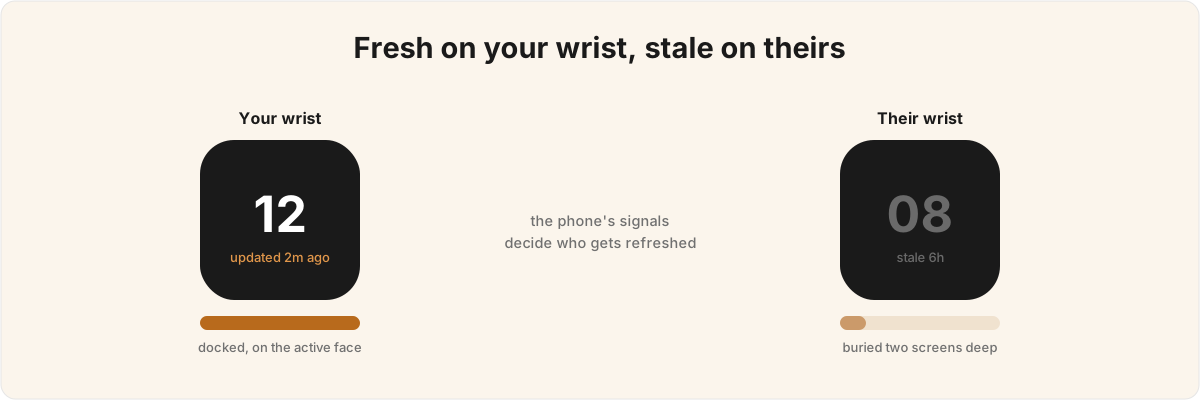
So why does a watch complication go stale on a user's wrist when the same code refreshes fine on the developer's? It is almost never the fetch code. watchOS rations background time, the rationing depends on signals most teams have never read about, and a developer's own watch happens to receive every one of them. What goes wrong is the buried assumption that the watch is a small phone that runs your code whenever you ask. It doesn't, and the point where it stops is where a "works on my machine" failure hides.
Why doesn't my watchOS background refresh fire when I scheduled it? 
watchOS does not promise to run your scheduled refresh at the time you ask - the system decides when, weighing a handful of conditions you don't control. You call scheduleBackgroundRefresh(withPreferredDate:userInfo:scheduledCompletion:) with a preferred date, and "preferred" is doing real work in that signature. Apple is explicit that every app gets an allocation and the system chooses when to spend it based on current conditions.[1]1. Apple, "Keeping your watchOS app's content up to date" - every app receives a background allocation and the system chooses when to run scheduled tasks based on current conditions, including whether the app has a complication on the active face and whether it sits in the user's Dock. Scheduled via scheduleBackgroundRefresh(withPreferredDate:userInfo:scheduledCompletion:). The lever most teams miss is which conditions earn that time and which burn it.
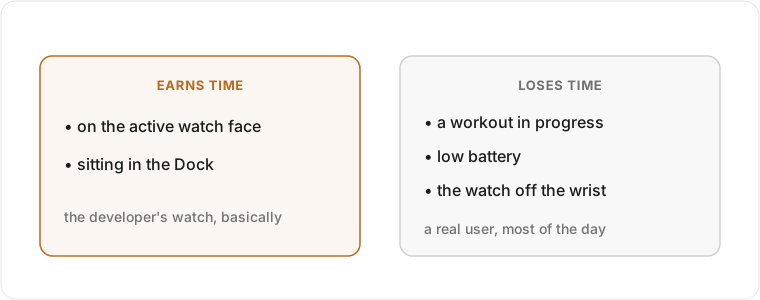
A complication on the active watch face buys you priority. So does sitting in the user's Dock. A workout in progress, a low battery, or the watch off the wrist on a nightstand all push the other way. Read that against how an app gets built: the developer keeps the test app in the Dock, on the face they are debugging, with the watch on a charger most of the day - accidentally assembling the maximum-priority case before declaring the feature done. The user keeps the app two screens into the grid, never adds the complication, and takes the watch off at 11pm. The binary is identical and the budget is nothing alike, and that stays invisible until you test under the conditions a real wrist produces.
The fix is never "schedule more aggressively." Hammering scheduleBackgroundRefresh does not raise your allocation; you just exhaust a smaller share faster and the system trusts you less. The design problem is the fallback: because some refreshes will silently never fire, the app has to recompute fresh data the moment the user foregrounds it, so a missed wake costs them nothing they can see. An app that leans on the background refresh as its primary path goes stale on the wrist; one that treats it as an optimisation over a solid foreground path keeps showing the right number.
My app doesn't crash but it dies in the background - what's killing it? 
It is almost certainly an unfulfilled task-completion contract, and it surfaces as a SIGKILL that reads in the logs like a random crash. When the system wakes your app for background work it hands you a WKRefreshBackgroundTask, and every one has to reach setTaskCompletedWithSnapshot. Miss a branch and nothing throws - you quietly hold the task open, drain the budget, and take an EXC_CRASH (SIGKILL) on a later wake, which is the part that sends people debugging the wrong thing entirely.
The trap is that you receive tasks you never asked for. On the WatchKit delegate path, handle(_:) is handed every background task at once: your app-refresh task, plus the WKURLSessionRefreshBackgroundTask for any background download and the WKWatchConnectivityRefreshBackgroundTask for data arriving from the phone. Each one needs completing, and the asynchronous ones must be completed after their delegate callbacks fire, not inside handle(_:). Save the URLSession task, let the session finish downloading, move the file off the temp path the system is about to delete, and only then complete. Most stale-complication bugs that look like networking failures are really one un-completed branch starving the budget for everything else. On the bench, with a fast charger and a strong connection, the budget never runs dry enough for the missing completion to bite, so it never reproduces. (A related trap: mixing the SwiftUI .backgroundTask(.appRefresh) hook with a delegate's handle(_:) in one app produces duplicate or dropped tasks - pick one, and put new work on the SwiftUI scene hook.) This is the sort of build-specific failure I get called in to untangle as an Apple Watch consultant, and the symptom almost never points at the cause.
Why is my watch app fine in the Simulator but broken on a real device? 
Because the Simulator runs networking the device flatly refuses. The headline rule, from Apple's own technical note TN3135, is that low-level networking is blocked on watchOS for ordinary apps.[2]2. Apple, Technical Note TN3135, "Low-level networking on watchOS" - NWConnection, NWBrowser, NWPathMonitor, URLSessionStreamTask, URLSessionWebSocketTask, and BSD sockets are blocked outside audio-streaming, CallKit VoIP, and tvOS-pairing apps; a blocked connection stays in .waiting(_:) with ENETDOWN. If your code reaches for NWConnection, a raw URLSessionStreamTask or URLSessionWebSocketTask, NWBrowser, NWPathMonitor, or a BSD socket, the connection sits in .waiting with ENETDOWN on real hardware and a path monitor stays permanently .unsatisfied. The Simulator does not enforce any of this, so the code passes every test on the developer's Mac and fails on the first physical watch - usually the tester's, usually after launch.
Only three lanes get the exception: an app actively streaming audio, a CallKit VoIP app during a call, and tvOS device pairing. Everything else routes every byte through URLSession, including the convenience loaders people reach for out of habit; Data(contentsOf:) on a network URL is unsupported on the device, full stop. The second device-only trap is the path itself. A watch reaches the internet three ways: proxied through the paired iPhone over Bluetooth, over known Wi-Fi, or over its own cellular on the LTE models. A bug that only appears when the phone is asleep or out of Bluetooth range stays hidden through an entire test cycle, because nobody works with the watch deliberately separated from its phone - and toggling Wi-Fi in Control Center doesn't isolate it, it only disconnects. Reproducing the failure means forcing each route on purpose, the step a busy team skips.
Why do my complications stop updating after a few hours, or after an OS update? 
Two different mechanisms, and they look identical from the outside, which is why teams chase the wrong one. The first is a quota: if you push complication updates from the phone with transferCurrentComplicationUserInfo, Watch Connectivity caps you at roughly fifty complication transfers per day, and past that the system throttles you silently.[3]3. The Watch Connectivity complication-transfer budget is roughly 50 transfers per day via transferCurrentComplicationUserInfo; past that the system throttles silently. For higher-frequency updates, reloading the widget timeline via push (rather than a WidgetCenter call) is the supported path. See Apple's WCSession documentation and WWDC 2026 session 277, "WidgetKit foundations," on reload policies and push-driven reloads. A design that says "push every change from the phone to the wrist" sails through a demo with a handful of changes and then, on a real user generating dozens of updates a day, simply stops part-way through the afternoon. No error, no log line, just a complication frozen on whatever number it held when the budget ran out. The right tool when data changes that often is APNs push to the widget, with the Watch Connectivity transfer reserved for genuine user-visible-change moments rather than every tick.
The second mechanism bites on migration. The moment you offer a single WidgetKit complication, watchOS stops calling ClockKit entirely.[4]4. Apple, "Creating accessory widgets and watch complications" - as soon as an app offers a widget-based complication, the system stops calling ClockKit APIs, so a partial ClockKit-to-WidgetKit migration silently disables the un-migrated complications. Not for the complication you converted - for all of them. A team part-way through moving an older app off ClockKit ships an update with one new WidgetKit complication and silently kills every ClockKit complication they hadn't converted yet, on every device that installs it. It passes review, it passes the team's own testing if they only check the new one, and it breaks the moment a long-time user updates and finds their familiar complications dead. The discipline is to convert every complication in a single release. That is a release-planning decision as much as a coding one, and it is why a half-finished migration leaves users worse off than one you haven't begun. I spent five years on Epsy, an FDA-regulated epilepsy app where a watch reading feeding a clinical record could not silently go missing, and much of that work was exactly this: knowing where watchOS quietly stops calling your code, and building so the gap never reaches a user.
How do I know whether to even put this feature on the watch? 
Decide by what the surface is for. On watchOS the same data can belong on a complication, a Smart Stack widget, a Live Activity, or a control, and those surfaces are not interchangeable. A quick action that flips a setting is a control; glanceable info through the day is a widget; an event with a clear start and end is a Live Activity. Put the right job on the wrong surface and the feature feels slightly off even when every piece works.
Most of the engineering then goes into making the thing relevant rather than merely present. The Smart Stack only shows your widget when the system predicts it matters, and you supply those predictions - a date interval, a location category, a fitness state. Get them wrong and a perfectly good widget never surfaces, which from a user's view is indistinguishable from a broken one. Teams that ship a watch app worth keeping design for the watch's constraints from the start, instead of porting an iPhone screen and then meeting the battery limit, the networking restrictions, and the rationed background time as a string of production bugs.
If your complication has gone stale and the fetch code looks right, the budget, the completion contract, and the networking lane are where I would look before touching anything else, and worth ruling out before the next build chases the wrong fix. If you want a second pair of eyes on a watchOS app that works on the bench and misbehaves on the wrist, send it over and I'll tell you which of these you're looking at. They each need a different fix, and the symptom won't tell you which.
Apple, "Keeping your watchOS app's content up to date" - every app receives a background allocation and the system chooses when to run scheduled tasks based on current conditions, including whether the app has a complication on the active face and whether it sits in the user's Dock. Scheduled via
scheduleBackgroundRefresh(withPreferredDate:userInfo:scheduledCompletion:). ↩︎Apple, Technical Note TN3135, "Low-level networking on watchOS" -
NWConnection,NWBrowser,NWPathMonitor,URLSessionStreamTask,URLSessionWebSocketTask, and BSD sockets are blocked outside audio-streaming, CallKit VoIP, and tvOS-pairing apps; a blocked connection stays in.waiting(_:)withENETDOWN. ↩︎The Watch Connectivity complication-transfer budget is roughly 50 transfers per day via
transferCurrentComplicationUserInfo; past that the system throttles silently. For higher-frequency updates, reloading the widget timeline via push (rather than a WidgetCenter call) is the supported path. See Apple'sWCSessiondocumentation and WWDC 2026 session 277, "WidgetKit foundations," on reload policies and push-driven reloads. ↩︎Apple, "Creating accessory widgets and watch complications" - as soon as an app offers a widget-based complication, the system stops calling ClockKit APIs, so a partial ClockKit-to-WidgetKit migration silently disables the un-migrated complications. ↩︎