Why does my Core Bluetooth app disconnect from hardware in the field but work on the bench?
An iOS BLE developer on why Bluetooth peripherals drop in the field after passing every bench test, and why it's rarely the firmware's fault.
The peripheral pairs in seconds at your desk. Values stream, writes land, the demo is clean. Then a tester takes it outside, puts the phone in a pocket, walks across a warehouse, and the connection starts dropping and limping back. This is the call I get most as an iOS BLE developer. The firmware team swears nothing changed, and they're usually right. The bug almost never lives in the radio. It lives in how the app drives Core Bluetooth, and the bench is the one environment that hides that.
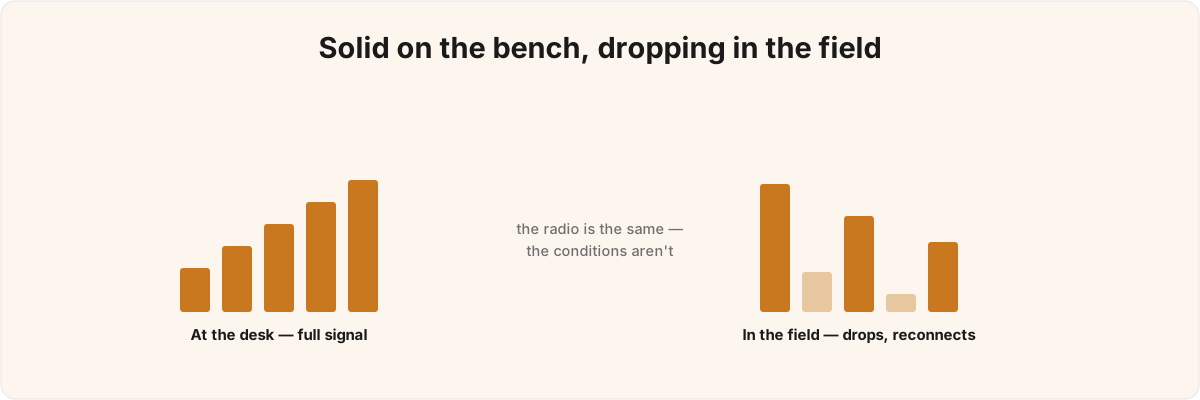
So is it the hardware? Almost never. A peripheral that round-trips cleanly on a desk is doing its job; the field is just the first place the app's missing lifecycle and reconnect handling shows up.
Why it works on the bench and fails everywhere else 
A desk is a best-case RF environment: app in the foreground, screen on, phone two feet from the peripheral. Move into a real building and contention, distance, and the phone's own body start dropping packets, and a Core Bluetooth connection that was never told how to recover just gives up.
The bench is misleading because it removes every variable that triggers the failure at once. BLE shares the 2.4 GHz band with Wi-Fi and every other Bluetooth device in the room, and frequency hopping only buys so much margin before retransmissions pile up. Your own hand attenuates the signal; a phone face-down on a desk and one in a jeans pocket are not the same antenna.
One assumption has to change first: a dropped BLE link is normal, and absorbing it is the app's job. Hardware teams tend to read a disconnect as a defect to eliminate. In the field links drop constantly, and the question is never whether yours will, only whether the app notices and reconnects fast enough that a human doesn't. An app built on the bench assumption that you connect once and stay put has no answer when the radio behaves like a radio.
What happens to a Core Bluetooth connection when the phone goes in a pocket? 
The moment the screen locks or the app is backgrounded, iOS suspends your process, and any CBCentralManager work not set up to survive that suspension stops cold. It's invisible on a bench because the bench never locks the screen.
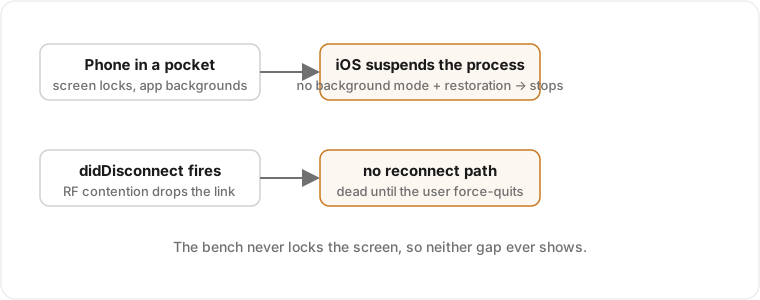
There are two separate gaps here, and teams usually have at least one. The first is the background mode. Without the bluetooth-central mode declared and state preservation wired up through the central manager's restoration identifier, a backgrounded app loses its connection the instant iOS reclaims memory, and may never be relaunched into the state it left.[1]1. Core Bluetooth state preservation and restoration requires the bluetooth-central background execution mode and a restoration identifier passed when the CBCentralManager is created; see Apple's Core Bluetooth documentation, "Core Bluetooth Background Processing for iOS Apps." State restoration is what lets the system relaunch your app when a known peripheral reappears and hand you back the CBCentralManager you had. Skip it, and "I locked my phone and the device stopped working" is the bug report you'll get, with no crash and no log to explain it. App Review also checks that mode against actual behaviour, so declaring it on an app that doesn't genuinely use background Bluetooth is its own rejection risk.[2]2. App Store Review Guideline 2.5.4 restricts background execution modes to apps whose declared use is genuine; declaring background Bluetooth without using it is grounds for rejection.
The second gap is the recovery path, forgotten even when backgrounding is handled. When the link drops, didDisconnectPeripheral fires. If your code doesn't re-initiate the connection, and doesn't wait for centralManagerDidUpdateState to report poweredOn before it tries, the disconnect is permanent until the user force-quits and reopens. Retrying blindly the millisecond a drop is reported is almost as bad: it spins the radio and drains the battery while still failing to reconnect, because Bluetooth wasn't ready. Waiting for poweredOn and then reconnecting on a backoff is the unglamorous bit that gets cut when a deadline is close.
What do teams get wrong about the Core Bluetooth API itself? 
The most common mistake is treating BLE as request/response. Core Bluetooth is an asynchronous, callback-driven state machine, and most of the failures are timing problems dressed up as hardware flakiness.
The classic version is writing a characteristic before service discovery has finished. The call doesn't throw; it just does nothing useful, because the services and characteristics aren't resolved yet, and the team spends a day blaming the firmware for "ignoring writes." Right behind it is throughput. Every BLE connection negotiates an MTU and a connection interval that cap how much data moves per unit time. A write longer than maximumWriteValueLength is silently truncated, and writes pushed out faster than the negotiated interval back up until notifications queue and the throughput you measured on the bench collapses to a fraction in the field.[3]3. Maximum write length for a characteristic is exposed via CBPeripheral's maximumWriteValueLength(for:), and effective throughput is bounded by the negotiated ATT MTU and connection interval; see Apple's CBPeripheral documentation. All of it stays invisible until contention and distance shrink your effective bandwidth.
The harder problem is that the symptom rarely points at the cause. A truncated write, a too-aggressive write loop, a missed discovery step, or a weak signal can all surface as "the device sometimes returns garbage" or "it works for ten minutes then stops." A log line that says the value didn't arrive won't tell you which of those bit you. That's why these bugs survive QA and why they're miserable to debug remotely: one symptom, several unrelated root causes. Sorting out which is in play, on your hardware, is most of the BLE work I get pulled into, once the device exists and the iOS side won't behave.
Why does my NFC reader pass the test tag but fail on the production batch? 
Because Core NFC is even less forgiving about its preconditions than Core Bluetooth, and a clean test tag hides most of them. An NFCReaderSession runs on a strict, system-imposed timeout, only scans while your app is in the foreground, and needs both the Near Field Communication Tag Reading entitlement and the right Info.plist declarations for the tag types and application identifiers you read.[4]4. Core NFC tag reading requires the Near Field Communication Tag Reading entitlement plus NFCReaderUsageDescription and, for ISO 7816 / application-identifier reads, the com.apple.developer.nfc.readersession.iso7816.select-identifiers key in Info.plist; see Apple's Core NFC documentation for NFCReaderSession and NFCTagReaderSession. Miss one and the reader that worked on a pristine NDEF sample fails on the production batch.
The trap is that "NFC" is several protocols sharing one logo. A reader configured for NDEF messages will not transparently talk to an ISO 7816 smartcard applet or a MIFARE tag; those go through different tag families and need their application identifiers listed up front in the entitlement. Test tags are usually clean, foreground, single-protocol, and held still, the exact conditions production tags fail to meet. A real tag gets read by a moving hand, through a case, from a batch with a chip variant nobody told the app about. The reverse-engineering and entitlement work behind my Apple Wallet pass for gym hardware lives in the same corner of iOS: the radio is fine, the plumbing and the permissions are where it goes wrong, and getting the Wallet and PassKit entitlements right is the same discipline as getting the NFC ones right.
So is the bug in the radio or in the app, and how do you tell? 
You tell by reproducing the failure under the conditions that cause it: backgrounded, at range, in radio contention, with a production tag instead of a clean one. The answer is almost always the app, but proving it cheaply is the skill, because from the outside a radio problem and a state-machine problem produce identical logs.
You separate them by instrumenting the connection's lifecycle and watching where it diverges from the happy path: what state the manager is in when reconnect is attempted, whether discovery completed before the write, what MTU was negotiated versus assumed, whether the session timed out or the tag was the wrong protocol. Once you know which it is, the fix is build-specific and small: the right background modes, sane state restoration, a reconnect policy gated on poweredOn, a write strategy that respects the negotiated MTU, an entitlement list covering the real tag family. Get one wrong and the symptom looks the same whatever the cause, which is why throwing more firmware at it never works.
A device in the field has to keep working as conditions degrade, where a demo only has to look good for one clean run. It's the same problem I wrote about in designing software for things that physically wear out: reconnect and throughput are real behaviour the app owns, and an app that treats them as edge-case error handling is the one that gets returns. When the failure looks instead like the app's handling of credentials, pairing keys, or what crosses the link in the clear, that bleeds into an iOS security audit, worth scoping deliberately rather than guessing at.
I've shipped iOS apps for more than ten years, a dozen-plus on the App Store, several featured by Apple, and the Core Bluetooth state machine and Core NFC's session model are the parts I keep getting handed once a device exists. If your peripheral is solid but the iOS side drops it the moment it leaves the bench, send me the disconnect logs and where it fails. Telling the radio bug from the app bug is most of the job.
Core Bluetooth state preservation and restoration requires the
bluetooth-centralbackground execution mode and a restoration identifier passed when theCBCentralManageris created; see Apple's Core Bluetooth documentation, "Core Bluetooth Background Processing for iOS Apps." ↩︎App Store Review Guideline 2.5.4 restricts background execution modes to apps whose declared use is genuine; declaring background Bluetooth without using it is grounds for rejection. ↩︎
Maximum write length for a characteristic is exposed via
CBPeripheral'smaximumWriteValueLength(for:), and effective throughput is bounded by the negotiated ATT MTU and connection interval; see Apple'sCBPeripheraldocumentation. ↩︎Core NFC tag reading requires the Near Field Communication Tag Reading entitlement plus
NFCReaderUsageDescriptionand, for ISO 7816 / application-identifier reads, thecom.apple.developer.nfc.readersession.iso7816.select-identifierskey inInfo.plist; see Apple's Core NFC documentation forNFCReaderSessionandNFCTagReaderSession. ↩︎