Why a custom SwiftUI animation that's smooth on your phone stutters on everyone else's
A SwiftUI custom UI that demos beautifully often falls apart on Dynamic Type, dark mode, and older devices. Here's why, and where it breaks.
You built a SwiftUI custom UI that looks great in the simulator. The motion feels right, the designer signed off, you shipped. Then the support inbox starts filling up: text clips at the largest accessibility sizes, a panel goes invisible in dark mode, scroll hitches on anything older than the phone you tested on. The custom iOS animations that sold the app are now what people email you about.
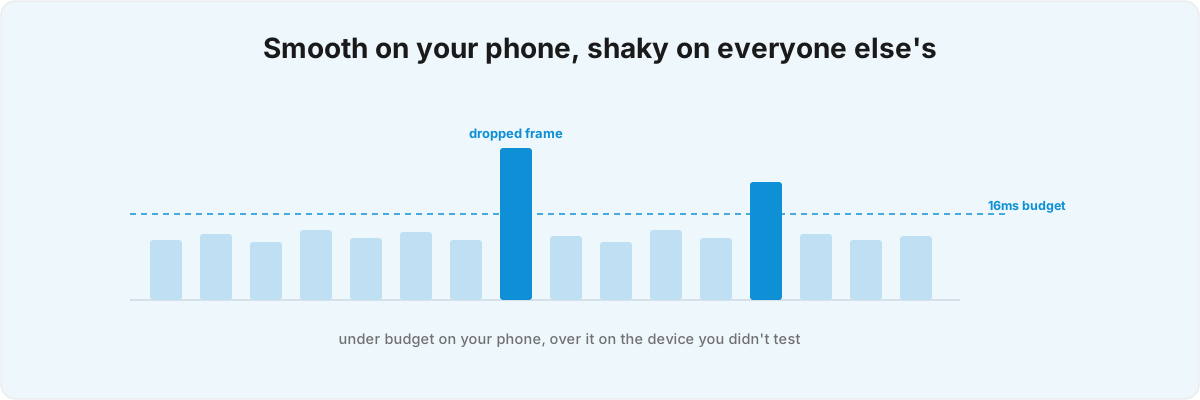
The animation never changed between your device and theirs. What changed is everything around it: the type size, the colour scheme, the GPU, the moment at which the layout actually resolves. Most of the work in custom UI goes into conditions you can't see from your desk, and the gap between a demo that lands and a screen that holds up is wider than it looks.
Why does a custom SwiftUI animation stutter on other people's phones? 
Because the demo and the real device are different machines, and the stutter is almost always a layout problem wearing an animation costume. On your phone the layout gets measured once, the type size is the default, and every view fits on screen. None of that holds for users, and the moment one of those assumptions slips, the motion has to recompute geometry in the same frame it's trying to draw.
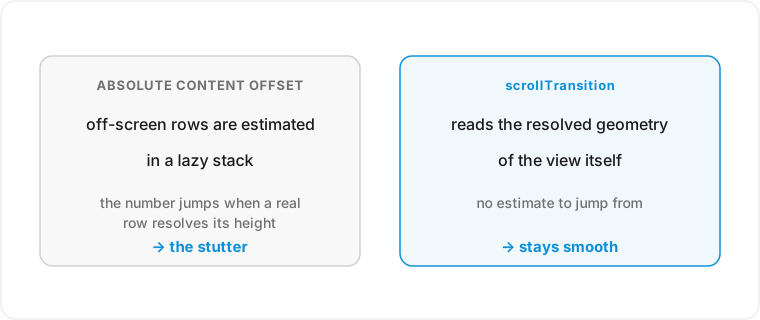
The most common failure I see in a custom iOS interface is scroll-linked motion driven off the wrong signal. In a lazy stack the sizes and offsets of off-screen rows are only estimated until a row is laid out for real, so reading the absolute content offset to drive a header or a parallax effect gives you numbers that jump the moment a real row resolves to its true height.[1]1. WWDC 2026, session 321, "Dive into lazy stacks and scrolling with SwiftUI" - off-screen sizes and offsets are estimated, so drive scroll-linked UI off resolved visibility (onScrollTargetVisibilityChange) rather than absolute content offset, and set up in init because body runs before onAppear. Apple's guidance is now explicit about this: drive scroll effects off the resolved visibility of the views themselves rather than a raw offset, which is exactly the source most hand-built effects predate. A scrollTransition that pushes a hidden view into the visible rect forces that estimate to resolve mid-animation, and that resolve is your stutter.
The second trap is doing layout work after a view appears. body runs before onAppear, so a custom interface that mutates its layout inside onAppear is always a frame behind during a fast flick. Anything the view needs to be ready before it's seen has to happen in init, while the appear callback is already too late. Working out whether a given effect belongs in the layout pass, the initialiser, or a custom Layout is where the time actually goes. Once the view has shown up, patching the motion on afterwards never quite catches up, and no amount of tuning the animation curve closes that distance.
There's a third, quieter version of this that only shows up on long lists. A ForEach row that resolves to a different number of subviews depending on its data (a badge that's sometimes there, a conditional caption) makes the lazy stack keep stale views alive by index, and the cost lands as a hitch when you scroll back past them. You fix it by filtering the data before it reaches the view, well upstream of any animation, so the leaf views stop changing shape under the stack's feet.
What breaks a custom iOS interface that looked fine in the demo? 
Dynamic Type and dark mode, most of the time, because they're a layout constraint that gets treated as a final QA pass. A bespoke component built with hard-coded frames and offset math looks pixel-perfect at the default size and breaks the instant someone bumps their text up two steps. The geometry has to follow the type instead of fighting it, and that's a layout-time decision you can't retrofit later. SwiftUI's custom alignment guides float subviews against a container's edges without any offset arithmetic, which is exactly the tool for a component that has to stay aligned as the type grows.[2]2. WWDC 2026, session 322, "Compose advanced graphics effects with SwiftUI" - custom alignment guides float subviews against container edges without offset math by overriding alignmentGuide and defining custom alignments via ViewDimensions. Reaching for them is a structural choice, awkward to bolt on once the frames are already hard-coded.
Colour runs into a related problem, and it got sharper under Liquid Glass. The system reads tint out of the content layer rather than the navigation chrome, so a brand colour pinned to the wrong layer either gets ignored or fights the glass and goes muddy in one of the two appearances.[3]3. WWDC 2026, session 251, "Communicate your brand identity on iOS" - the UI (navigation) layer sits above the content layer; tint and colour belong in the content/scroll area so Liquid Glass picks them up, and custom fonts must support Dynamic Type. A custom font is the other reliable casualty: if it doesn't ship Dynamic Type support, it won't scale at all, and the careful spacing you built around it collapses the moment the system tries to grow it. I've shipped enough SwiftUI to know these aren't edge cases but the default state of any device that isn't yours, and a screen that holds up at exactly one type size in one appearance is broken for most of the people who install it.
The reason this slips through is that the demo device is the most forgiving machine you own. It runs the latest OS at the default text size with the most GPU headroom, and it's the one the designer was looking at. Every other phone in your install base is older or slower or running a bigger type size or a darker scheme, often several of those at once, and the custom UI has to hold up under the whole set.
Are SwiftUI shader effects worth it, or will they cost you battery? 
Sometimes worth it, often not, and it depends on the oldest device in your install base rather than the newest one in your pocket. SwiftUI's shader effects (colorEffect, distortionEffect, layerEffect) drop down to Metal, recoloring per pixel, remapping position, or sampling the whole layer for blur and warp.[4]4. WWDC 2026, session 322, "Compose advanced graphics effects with SwiftUI" - colorEffect, distortionEffect, and layerEffect call Metal; shaders are stateless and animate by feeding a TimelineView timestamp into the shader function. Used well they make an effect read as built-in instead of bolted on, and they're the right tool for organic motion that the standard animation curves can't express.
The catch is the bill. Shaders are stateless, so you animate them by feeding a TimelineView timestamp into the function every frame, which means the GPU is doing real work on every displayed frame the effect is visible.[4:1]4. WWDC 2026, session 322, "Compose advanced graphics effects with SwiftUI" - colorEffect, distortionEffect, and layerEffect call Metal; shaders are stateless and animate by feeding a TimelineView timestamp into the shader function. A layerEffect that samples the entire layer is the expensive one, and a screen full of them will quietly cost you battery and frame rate on a four-year-old phone you don't own and didn't test on. It always looks good on the device you built it on, so the thing to check is whether it still earns its place on the slowest hardware you still support. A quick build skips that check, because the cost stays invisible until someone else pays it.
This is where custom UI stops being a design question and becomes a performance one. A shader that runs smooth on a new phone can drain an old one, and knowing where that line sits comes down to the same habit as keeping any expensive work off the critical path. I've written before about keeping heavy work off the main thread for exactly this reason: the UI thread doesn't care whether the work is a neural network or a fragment shader, only that it's stealing frames.
Why does do-it-yourself custom UI usually ship the fragile version? 
Because the fragile version demos in an afternoon, while the version that holds up takes weeks of cases you can't see until you go looking for them. A bespoke screen built for your own phone, at your own type size and appearance, will pass every check you run on it and fail the moment it meets the install base. What separates the two is rarely more animation; it's the diagnosis of which conditions break the layout, and how deep the fix has to go.
That diagnosis is most of the job, and it's the part a do-it-yourself pass tends to skip, because it stays invisible right up until the support inbox makes it visible. A scroll-linked header reading the wrong position, a panel built on hard-coded frames, a shader that's free on your phone and expensive on everyone else's: each one looks finished, and each one is a layout decision made at the wrong layer. A clipped label or a stuttering scroll points fairly reliably back at its cause, but reading that pointer takes having seen the failure mode before. The same problem turns up across my work, whether it's a screen that has to behave at every edge case or a Core ML pipeline that tests clean and ships wrong: the bug is rarely where you'd look first, and the fix is rarely the thing you'd reach for first.
Nearly everything I ship is SwiftUI, including apps like Layered and Constellation
 , and the custom UI in them holds up on the older and larger-typed devices in the long tail because that was decided before the first frame was drawn. If you have a screen that looks great on your device and shaky on everyone else's, send me the screen and the devices it breaks on. Tell me what it does and where, and I'll tell you which layer it's coming from.
WWDC 2026, session 321, "Dive into lazy stacks and scrolling with SwiftUI" - off-screen sizes and offsets are estimated, so drive scroll-linked UI off resolved visibility (
onScrollTargetVisibilityChange) rather than absolute content offset, and set up ininitbecausebodyruns beforeonAppear. ↩︎WWDC 2026, session 322, "Compose advanced graphics effects with SwiftUI" - custom alignment guides float subviews against container edges without
offsetmath by overridingalignmentGuideand defining custom alignments viaViewDimensions. ↩︎WWDC 2026, session 251, "Communicate your brand identity on iOS" - the UI (navigation) layer sits above the content layer; tint and colour belong in the content/scroll area so Liquid Glass picks them up, and custom fonts must support Dynamic Type. ↩︎
WWDC 2026, session 322, "Compose advanced graphics effects with SwiftUI" -
colorEffect,distortionEffect, andlayerEffectcall Metal; shaders are stateless and animate by feeding aTimelineViewtimestamp into the shader function. ↩︎ ↩︎