Why my Apple Foundation Models feature works in the demo but breaks in the shipped app
Apple Foundation Models run on a small on-device model with a 4096-token window, so the feature that demos fine breaks on real data and older phones.
The first time you wire up Apple Foundation Models with a LanguageModelSession, it just works. You ask the on-device model a question, it answers in about a second, and the Apple Intelligence integration feels free. Then the same code goes into the shipped app, a real conversation grows past a few turns, a tester on an older phone sees nothing at all, and the feature that looked finished starts failing for the people who use it most.
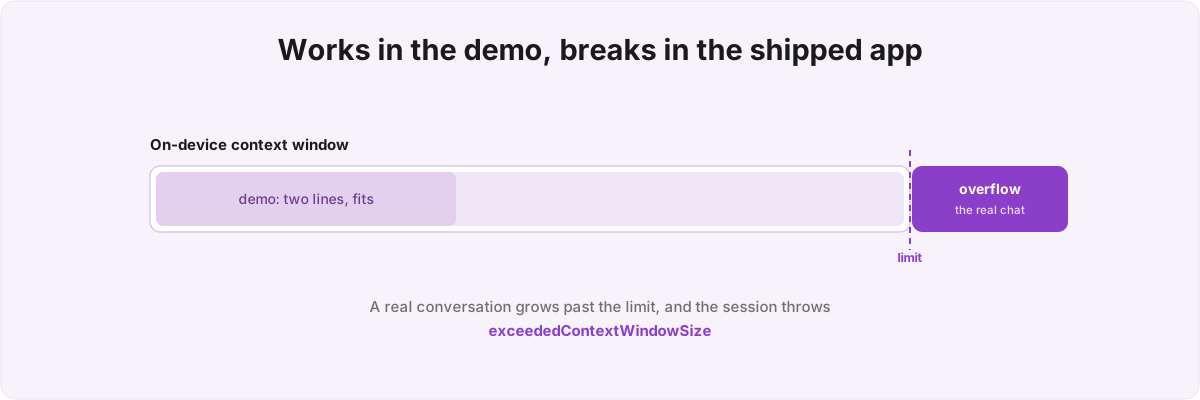
So why does the polished demo break the moment it meets real data? You demo and ship against the same small on-device model, but the demo path never loaded it the way a real session does. The bug is rarely in the model. It lives in the gap between the prompt you typed once and a transcript that keeps growing, on a device that is not yours, over a network you cannot see.
Why does my on-device LLM run out of room mid-conversation? 
SystemLanguageModel.default is a roughly 3-billion-parameter model running entirely on the phone, with a 4096-token context window, and everything has to fit inside that window at once. Your system instructions, every prior turn, every tool call and its output, and the new prompt all share the same ceiling. A chat that quotes back rows of data fills it far faster than a two-line demo suggests, and then LanguageModelSession throws GenerationError.exceededContextWindowSize.
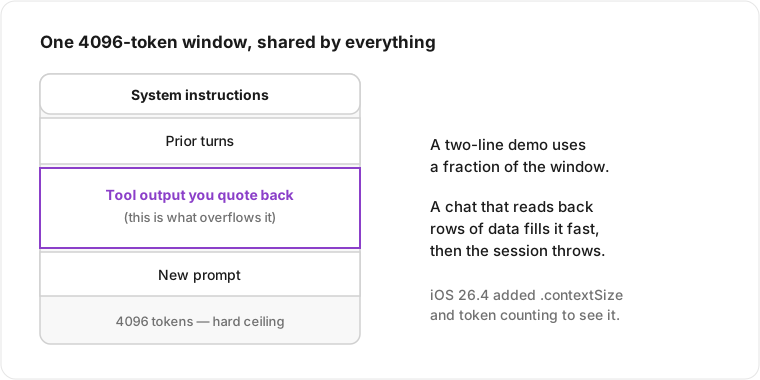
The token cost used to be invisible, which is why teams kept walking into the wall. iOS 26.4 added .contextSize and real token counting, and the framework now reports a usage property on sessions and responses with total, cache-read, and reasoning tokens,[1]1. WWDC 2026, session 241, "What's new in the Foundation Models framework" - .contextSize and token-counting APIs shipped in iOS 26.4, and the usage property on sessions and responses reports total, cache-read, and reasoning tokens. so token budget is something you can measure per turn instead of a number you discover from a crash report.
Knowing the wall is there does not tell you what to do when you hit it, and the two obvious answers are both wrong. Truncating the oldest turns silently makes the assistant forget what the user told it three messages ago; refusing to continue makes it feel broken. The recovery that holds is structural, and it is the part I withhold from a write-up because it is most of the work: deciding what in the transcript is load-bearing, what can be summarised into a single instruction, and what can be dropped without the user noticing. The model is also small enough that it will invent numbers if you let it, the same trap I wrote about when I handed a whole app to an on-device language model. The fix is feeding it pre-formatted values from your own cache that it quotes back verbatim, and constraining its output with @Generable and @Guide so it picks from declared cases rather than emitting free-form strings you then have to parse. Get that wrong and "the AI made up a figure" ends up in your App Store reviews.
Why does the feature work on my phone but fail on a tester's? 
Because availability is build-specific and device-specific, and the version most teams ship collapses three different failures into one generic "AI is unavailable" message that strands exactly the users the feature was for. You branch on SystemLanguageModel.default.availability, and each .unavailable reason deserves its own tested fallback: the device is not eligible, Apple Intelligence is switched off in Settings, or the model is still downloading. Those are three screens with three different calls to action, and folding them into one is the difference between a user who flips a toggle and keeps going and a user who decides your feature is broken.
There is a sharp edge here that costs people a release. The concrete type behind that .unavailable reason has shifted across iOS 26 dot-releases, so code that pattern-matched it cleanly in one build misreads it in the next, and the failure is silent: it compiles, it runs, it routes every rejected device to the wrong message. In Metrics I gave up matching the enum case directly and read the reason defensively, logging the literal string so a confused user can tell me which gate they tripped.
The errors deserve the same triage. exceededContextWindowSize is recoverable by rebuilding the session; guardrailViolation and unsupportedLanguageOrLocale are not, and treating them all as transient means a retry loop that burns battery on requests that were never going to succeed. iOS 26.4 also cut the guardrail false-positive rate against the 27 model,[2]2. WWDC 2026, session 241 - guardrail false-positive rate reduced between iOS 26.4 and the iOS 27 on-device model. so refusals that used to fire on innocuous prompts mostly stopped, but "mostly" is not "never," and a feature that occasionally refuses a normal request with no explanation reads as a bug. The shared LanguageModelError cases give you a vocabulary to classify all of this consistently,[3]3. WWDC 2026, session 339, "Bring an LLM provider to the Foundation Models framework" - the shared LanguageModelError cases (context overflow, rate limit, refusal) are preferred over custom error types so error handling stays uniform across models. which matters once a single session sits in front of more than one model. It is the same instinct I apply when an age rating decision hinges on how the store classifies a feature: work from the taxonomy Apple hands you, however much you wish it were cleaner.
Why is the first response slow, and what fixes it? 
The first response is slow because the model loads on demand, so a session you build only when the user taps pays a one-to-two-second cold start right when someone is already waiting on the screen. Prewarming is the fix, but it only helps if it happens before the first prompt, not as a side effect of it. In Metrics I instantiate the LanguageModelSession and bind its tools the moment the chat surface becomes available, well before the user types anything.
It helps to know what prewarming warms. Under the new abstraction layer a model provides a Configuration, which is Hashable and acts as the cache key for the executor that runs inference.[4]4. WWDC 2026, session 339 - a LanguageModel provides a Configuration that is Hashable and serves as the cache key in the session's executor store; unique configuration maps to one LanguageModelExecutor, which exposes prewarm() and diffs transcripts to preserve or invalidate its KV cache. A unique configuration maps to one executor, the executor store frees when the session does, and a stateful executor diffs transcripts across turns to preserve or invalidate its KV cache. So "prewarm" pays the executor-creation and first-load cost up front, so the cache exists before the user's first token arrives. Skip it and you pay that cost on the critical path every time.
You cannot tune any of this by reading the code, because the expensive parts happen inside the framework. The Foundation Models Instrument in Xcode 27 makes them visible: time-to-first-token, tokens per second, and total latency on their own lanes, and it catches a tool that silently never gets called because the model never selected it.[5]5. WWDC 2026, session 243, "Debug and profile agentic experiences with the Foundation Models Instrument" (Xcode 27) - instruction and inference lanes, token usage, time-to-first-token, tokens-per-second, and total latency; catches a tool that is never selected. That last one is the bug you will never find by inspection - your tool is registered, your code is correct, the model just decided not to invoke it, so the feature half-works in a way that looks like your data is wrong. I treat it the way I treat Instruments for a performance problem: the profiler is the only place the real cost is legible.
How do I keep the model from inventing numbers about my own data? 
You give it tools instead of facts, and you make the tools the only path to a real value. Stuffing a portfolio of apps and their daily history into the instructions would blow the 4096-token window on any non-trivial dataset, and worse, it invites the model to paraphrase a number into something plausible and wrong. In Metrics the on-device chat answers questions about App Store metrics by calling small tools that read from the same local cache the dashboard renders from - never the network - and return human-readable strings the model quotes back rather than recomputes.
The constraint that makes this safe is constrained decoding. Each tool's arguments are @Generable with @Guide descriptions, so the model cannot hallucinate a metric name or a date range; it selects from the enum cases you declared, and the schema is enforced during generation rather than validated after it. The model picks downloads or revenue from a fixed set, picks a date range from a fixed set, and the framework rejects anything outside the schema before your code ever sees it. A tool that returns a pre-formatted string like "downloads over the last 7 days: 138" gives the model a precise value to repeat; a tool that returns raw rows invites it to do arithmetic it is bad at.
One more layer matters for anything reading untrusted text. The framework now ships deterministic lifecycle modifiers on a profile: an .onToolCall hook fires before an executor runs a tool, so you can throw to block it, and a .historyTransform hook fires before the transcript renders to the model, so you can wrap untrusted tool output in spotlighting delimiters or redact PII.[6]6. WWDC 2026, session 347, "Secure your app: mitigate risks to agentic features" - deterministic profile lifecycle modifiers .onToolCall (throw to block before an executor runs a tool) and .historyTransform (spotlight or redact untrusted tool output before the transcript renders). If your tools ever return data from outside your app - a web result, another user's content, a shared document - those hooks are where you stop a prompt-injection payload from steering the session. For a portfolio chat reading your own cache the risk is low, but the moment a Foundation Models feature touches text a stranger wrote, that boundary is the work.
Should I send anything to the cloud, and how does that change the code? 
Only the requests the on-device model cannot handle, and the change is small in code while the work sits in everything around it. As of the iOS 27 cycle, one LanguageModelSession can sit in front of the on-device SystemLanguageModel, PrivateCloudComputeLanguageModel, or a third-party server model - Anthropic and Google ship Swift packages that conform to the same LanguageModel protocol - so swapping the backing model is, on paper, a one-line change.[7]7. WWDC 2026, session 339 - SystemLanguageModel and PrivateCloudComputeLanguageModel conform to the LanguageModel protocol alongside Anthropic and Google third-party server-model Swift packages, all behind one LanguageModelSession; the developer owns auth and billing for cloud paths via a token provider, Keychain, and App Attest. The shared error cases and the uniform usage reporting survive the swap, so your error handling does not fork per provider.
What does not come for free is everything the abstraction leaves to you. The routing decision - which request stays on device and which earns a round trip - is a product call the framework leaves to you, and getting it wrong either leaks data you promised to keep local or makes a feature that should feel instant wait on a network you cannot guarantee. The cloud paths need auth and billing you own: a token provider, Keychain storage, App Attest for the request that leaves the device.[7:1]7. WWDC 2026, session 339 - SystemLanguageModel and PrivateCloudComputeLanguageModel conform to the LanguageModel protocol alongside Anthropic and Google third-party server-model Swift packages, all behind one LanguageModelSession; the developer owns auth and billing for cloud paths via a token provider, Keychain, and App Attest. Private Cloud Compute keeps the privacy posture intact for Apple's own models, but a third-party server model is your contract with that vendor, your key rotation, and your bill. I make the same on-device-first call when I decide what belongs in an encrypted local store : the device is the default, and the burden of proof is on anything that leaves it.
I have shipped this. Metrics runs Apple Foundation Models on-device alongside App Intents and WidgetKit, so the context-window failures, the availability branches, the cold start, the made-up numbers, and the question of what stays local are problems I have worked through in production rather than read about. If your Apple Intelligence integration works in the demo and the shipped feature breaks, closing that gap is the Foundation Models integration work I do, and I can usually tell you within a session whether the model is the problem or the code feeding it is. A context-window overflow and a hallucinated number take opposite fixes.
WWDC 2026, session 241, "What's new in the Foundation Models framework" -
.contextSizeand token-counting APIs shipped in iOS 26.4, and theusageproperty on sessions and responses reports total, cache-read, and reasoning tokens. ↩︎WWDC 2026, session 241 - guardrail false-positive rate reduced between iOS 26.4 and the iOS 27 on-device model. ↩︎
WWDC 2026, session 339, "Bring an LLM provider to the Foundation Models framework" - the shared
LanguageModelErrorcases (context overflow, rate limit, refusal) are preferred over custom error types so error handling stays uniform across models. ↩︎WWDC 2026, session 339 - a
LanguageModelprovides aConfigurationthat isHashableand serves as the cache key in the session's executor store; unique configuration maps to oneLanguageModelExecutor, which exposesprewarm()and diffs transcripts to preserve or invalidate its KV cache. ↩︎WWDC 2026, session 243, "Debug and profile agentic experiences with the Foundation Models Instrument" (Xcode 27) - instruction and inference lanes, token usage, time-to-first-token, tokens-per-second, and total latency; catches a tool that is never selected. ↩︎
WWDC 2026, session 347, "Secure your app: mitigate risks to agentic features" - deterministic profile lifecycle modifiers
.onToolCall(throw to block before an executor runs a tool) and.historyTransform(spotlight or redact untrusted tool output before the transcript renders). ↩︎WWDC 2026, session 339 -
SystemLanguageModelandPrivateCloudComputeLanguageModelconform to theLanguageModelprotocol alongside Anthropic and Google third-party server-model Swift packages, all behind oneLanguageModelSession; the developer owns auth and billing for cloud paths via a token provider, Keychain, and App Attest. ↩︎ ↩︎