How do I do a SwiftUI migration from UIKit to TCA without a full rewrite?
A SwiftUI migration that adopts TCA screen by screen rarely fails on the views. It fails on where the app's state lives.
You have a working UIKit app and a SwiftUI migration you cannot stop the business to do all at once. The plan looks safe: convert one screen, host it in a UIHostingController, adopt The Composable Architecture as you go. The first screen converts in an afternoon. The third drags half the app behind it and stalls, and the code review on that pull request is twice as long as the diff, mostly people asking who actually owns a piece of data that two systems now both think they own.
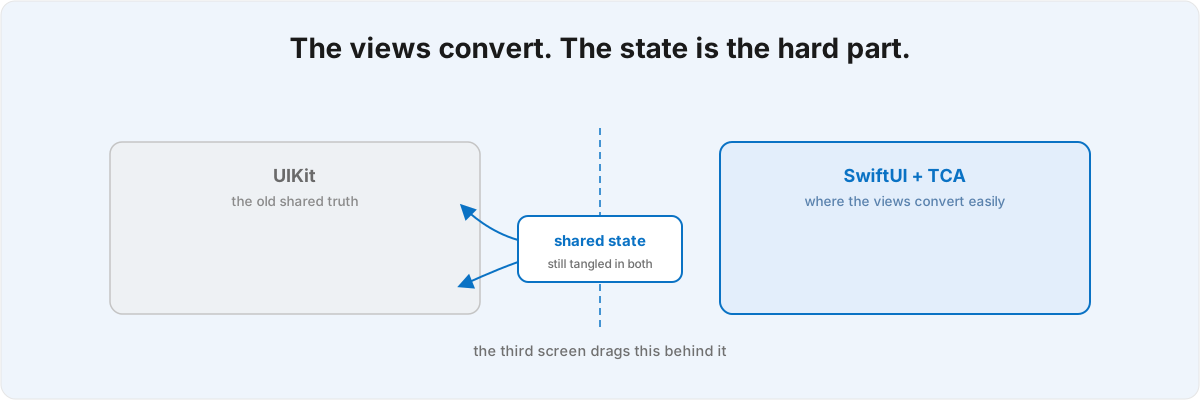
That is the pattern in nearly every migration I get handed. The views are rarely what bites you. The trouble is the data those views read and write, and how much of it the old UIKit world still owns.
Why does the SwiftUI migration stall when the views convert fine? 
Because the views are the easy part and your state is the hard part. A UIKit app keeps state spread across view controllers, singletons, and notification observers, and each screen quietly reads and mutates a slice of it. TCA wants that state owned by a tree of reducers and driven by a single Store. So when you convert a screen in isolation, you find its data was being changed by three other controllers you have not touched yet.
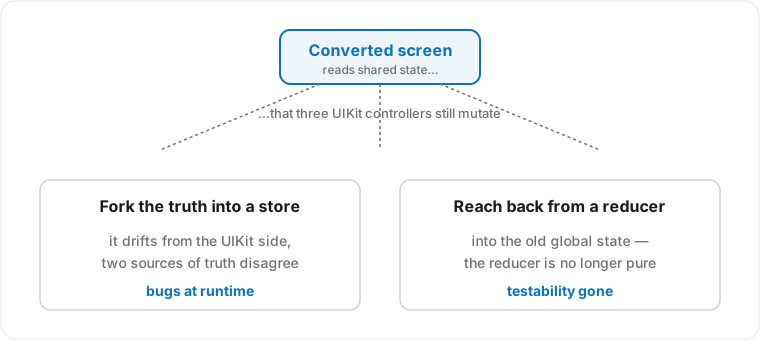
From there you have two exits and both are traps. You can fork the truth into a TCA store that holds its own copy of the data, and the SwiftUI and UIKit sides drift apart the moment an unmigrated controller mutates the original: two sources of truth that disagree, with bugs that surface at runtime on a screen that looked correct in isolation. Or you reach back into the old global state from inside a reducer, calling a singleton directly. That makes the feature work, but the reducer is no longer pure, and the testability that was the whole reason to adopt TCA is gone on the first feature you ship.
It helps to picture the migration as a moving boundary between two ownership models rather than a sequence of screens, where every screen you convert pushes a slice of state across that boundary. A screen converts cleanly only when all the state it touches has already crossed. The third one stalls because it shares a slice with code that has not moved, so now you are migrating that code too, whether you planned to or not.
What does iOS 27 change about the timeline? 
iOS 27 puts a hard gate under the whole plan, on the UIKit side you were not planning to touch yet. Building against the iOS 27 SDK requires the scene lifecycle, so an app that still boots from an app-delegate-owned window with no UISceneDelegate has to modernise that lifecycle before any further incremental SwiftUI work.[1]1. WWDC 2026, session 278, "Modernize your UIKit app" - the UIScene lifecycle (UISceneDelegate) is required when building with the iOS 27 SDK; an app that still vends its window directly from the app delegate will not launch until it adopts scenes. Apple's reference for the move is "Transitioning to the UIKit scene-based life-cycle."
The reason this is more than a checkbox is that the lifecycle and your state ownership are the same problem in different clothes. The app delegate is usually where the oldest global state lives: singletons constructed at launch, managers held by the window, notification wiring that fans out to controllers. Moving to scenes disturbs exactly the machinery your half-migrated screens are still quietly reading. So the gate is not a side errand off the migration. It forces you to settle state ownership at launch, which is the part you were hoping to pace out over the next few screens.
Xcode 27 ships agentic modernization skills that perform the mechanical lifecycle conversion for you and save a tedious week.[2]2. WWDC 2026, session 278, "Modernize your UIKit app" - the Xcode 27 app-modernization agent skill that converts an app to the scene lifecycle and other adaptivity passes automatically, exportable to other tools via xcrun agent skills export. What they cannot do is decide where your state should live afterwards, because that is a design question about your app, not a syntactic one about the SDK. The tool moves the window into a scene; it does not tell you whether the order manager that window held should become a TCA dependency, feature state, or something that stays in UIKit for another quarter. That decision is the work, and getting it wrong produces the two-sources-of-truth bug the tool cannot see.
One quieter iOS 27 change is worth knowing while you are in here. @State is now a macro that initialises once and lazily, backported to iOS 17.[3]3. WWDC 2026, session 269, "What's new in SwiftUI" - @State is now implemented as a macro with lazy, init-once semantics, back-deployed to iOS 17. In a migration that wraps existing object graphs in SwiftUI views, that removes a class of bug where a @State-held model was rebuilt on re-evaluation and silently threw away its work: a view that looks flaky but is really an initialisation-timing problem.
What does hiring a TCA developer buy you here? 
It buys judgement at the seam between old and new, which is where almost all of the trouble lives. Reducers and views are well-documented and you can write them yourself. The hard calls sit at the boundary, and they have no textbook answers because they depend on how your particular state moves.
Folding a feature in incrementally means parent/child reducer composition and deciding, for each piece of state, whether the new feature owns it outright or still borrows it from the UIKit side. Get that division right and the feature is testable in isolation from day one; get it wrong and you have built one of the two traps above with extra steps. Navigation is its own boundary: getting a UINavigationController and a TCA navigation tree to agree on who owns presentation breaks at runtime as a screen that will not dismiss or a back gesture that desyncs the stack from the state.
Then there are dependencies, which decide whether any of this is testable at all. Third-party SDKs for analytics, auth, payments, or networking have to be wrapped as injectable clients before a reducer can stay pure. Called inline, an SDK makes the feature impossible to test without the real service behind it. Wrapped behind a dependency client, the same reducer takes its collaborators as values you can substitute in a test. This is the highest-leverage decision in the migration and it is invisible in the diff: the wrapped and unwrapped versions look almost identical until the day you try to write the test.
The bridging tools help once you have decided where the line goes, but all they give you is wiring. UIViewControllerRepresentable and UIViewRepresentable let you embed existing UIKit views into SwiftUI piece by piece rather than rewriting them, which is what makes the incremental path possible at all. The interop improved in the 2026 releases: an @Observable model can now auto-redraw a hosted UIView because the system tracks which of its properties you read in draw and layout, so the manual setNeedsDisplay plumbing goes away.[4]4. WWDC 2026, session 272, "Use SwiftUI with AppKit and UIKit" - @Observable models auto-redraw hosted UIViews by tracking property access in draw/layout, default in the 2026 releases and back-deployable via the UIObservationTrackingEnabled Info.plist key. The session frames the whole interop story as incremental adoption without a full rewrite. (UIViewControllerRepresentable and UIViewRepresentable are long-standing APIs in Apple's SwiftUI framework reference.) Apple's own framing for that work is incremental adoption with no full rewrite needed, the same claim this post is making. None of it tells you where the state should live, which is still the decision the whole migration turns on.
Should you put a UIKit screen behind a TCA store, or rewrite it in SwiftUI? 
Pick by where the state already lives, not by how the screen looks. If a screen's state has already crossed into a reducer, rewriting its view in SwiftUI is cheap and you should just do it. If the screen is still reading and writing state that unmigrated controllers depend on, host the existing UIKit view inside SwiftUI and let it keep using the old truth until that slice is ready to move. The expensive mistake is rewriting a view whose state has not migrated: now you have a pristine SwiftUI screen wired into the old global world through the back door, the worst of both.
The corollary is that your state graph dictates the migration order, and your screen list mostly misleads you. Convert the leaves first, the screens whose state nothing else touches; watch where they were borrowing from, and the borrowed slices become the next batch to move. In that order the boundary contracts steadily and the third screen never stalls. In screen order, you hit a shared slice early and pay for it for weeks. Most of the value a composable architecture consultant adds is reading the state graph and handing back that order before you spend the weeks.
How do you keep the migration testable while it is half UIKit? 
You keep it testable by drawing the dependency boundary first and refusing to let a reducer reach past it, even temporarily. The discipline is simple to state and hard to hold under deadline: every collaborator is injected as a client, the reducer's state is the only truth it reads, and nothing inside it calls a singleton or touches UIKit directly. Hold that line and each feature is testable the moment it lands, no matter how much of the app around it is still UIKit. Break it once "just for this screen" and impurity spreads, because the next feature that borrows from the first inherits the hidden input.
This is the stack I build greenfield on, so the shape you are migrating toward is one I work in daily. Murmur is SwiftUI and TCA end to end: a single
 Store over the whole app, an AppFeature root that composes its children with Scope and .ifLet, and every service (storage, monetization, analytics) wrapped behind a @Dependency client so the reducers stay pure. Knowing what the finished architecture feels like is most of what tells you, mid-migration, whether a seam is temporary scaffold or a permanent mistake.
A migration like this usually overlaps performance work, because a half-migrated app runs two state systems at once and the duplicated redraws show up as jank long before the migration finishes. The lifecycle gate is the same flavour of forced-modernization deadline I have written about for other ageing iOS plumbing: Apple changes a requirement, and work you had paced over quarters suddenly has a date on it.
If your uikit to swiftui work has stalled on a screen that will not come loose, the fastest thing to send me is the feature and a sketch of how its state moves: what it reads, what writes it, and what else touches the same data. That is usually enough to tell where the seam belongs and what order to convert in. Send me the feature and I can tell you whether you are looking at a view problem or a state-ownership problem. They need very different fixes, and only one is the one you have been staring at.
WWDC 2026, session 278, "Modernize your UIKit app" - the
UIScenelifecycle (UISceneDelegate) is required when building with the iOS 27 SDK; an app that still vends its window directly from the app delegate will not launch until it adopts scenes. Apple's reference for the move is "Transitioning to the UIKit scene-based life-cycle." ↩︎WWDC 2026, session 278, "Modernize your UIKit app" - the Xcode 27 app-modernization agent skill that converts an app to the scene lifecycle and other adaptivity passes automatically, exportable to other tools via
xcrun agent skills export. ↩︎WWDC 2026, session 269, "What's new in SwiftUI" -
@Stateis now implemented as a macro with lazy, init-once semantics, back-deployed to iOS 17. ↩︎WWDC 2026, session 272, "Use SwiftUI with AppKit and UIKit" -
@Observablemodels auto-redraw hostedUIViews by tracking property access indraw/layout, default in the 2026 releases and back-deployable via theUIObservationTrackingEnabledInfo.plist key. The session frames the whole interop story as incremental adoption without a full rewrite. (UIViewControllerRepresentableandUIViewRepresentableare long-standing APIs in Apple's SwiftUI framework reference.) ↩︎