How do I stop Claude Code or Xcode agents from writing to the wrong data in my iOS app?
An AI dev workflow on iOS built on Claude Code, Cursor, or Xcode agents fails quietly: a correct-looking write hits the wrong data.
The agent wrote code that compiled, passed its own read of the diff, and deleted a record it should never have touched. That is the failure mode most teams hit once an AI dev workflow on iOS gets pointed at real project data. The tools are fast and usually right, which is the trap: the one wrong call hides inside a hundred correct ones, and nothing throws an error to tell you it happened.
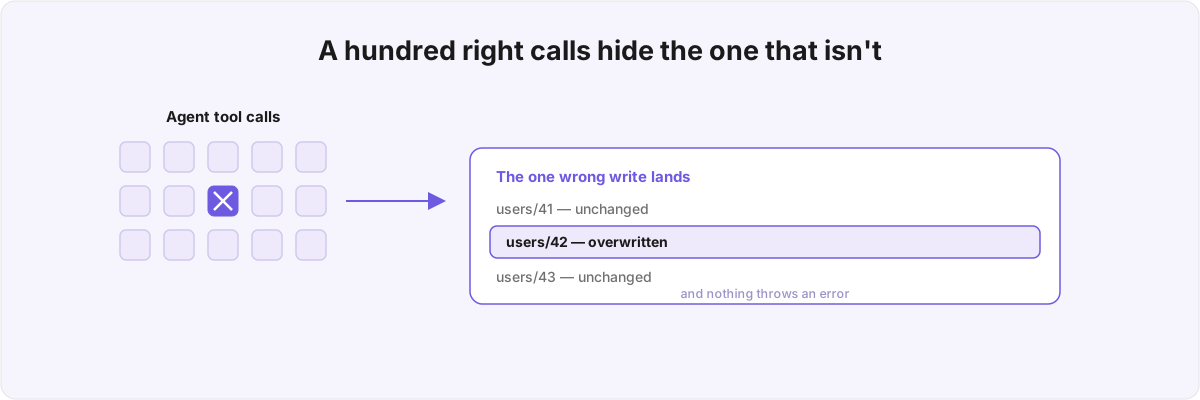
So what goes wrong when you give Claude Code or Xcode agents write access? Rarely bad code, because bad code gets caught by review and tests. The thing that slips through is the correct-looking tool call that mutates the wrong thing, fired because the model decided to fire it and nothing in your code stood in the way.
Why does the new tooling make this riskier? 
Because it hands agents more reach than the editor sandbox ever did. Xcode 27 ships built-in agents with whole-project context and four modes (explore, build, refine, orchestrate), and you can back them with Anthropic, OpenAI, Google, or a local MLX model.[1]1. WWDC 2026, "Xcode, agents, and you" (session 259) - four agent modes (explore/build/refine/orchestrate), whole-project context, plan mode, self-validation via Build/Preview/Test, parallel sub-agent orchestration, custom tools/agents; providers Anthropic/OpenAI/Google (session 122) plus local MLX (session 232). The agent-client protocol (ACP) lets plugins reach into the same project, and the Platforms State of the Union shipped Figma and GitHub plugins on day one.[2]2. WWDC 2026, Platforms State of the Union (session 122) - Xcode agent plugins via skills, MCP, and the agent-client protocol (ACP); Figma and GitHub ship plugins. Each of these is useful. Each also widens the surface where a confident agent can act on your data without you watching the exact call.
That reach is what makes the tooling worth using, and it is also where the danger lives. The old autocomplete proposed text into a buffer you could see. An agent in build mode validates itself against your build, your previews, and your tests, then orchestrates sub-agents in parallel,[1:1]1. WWDC 2026, "Xcode, agents, and you" (session 259) - four agent modes (explore/build/refine/orchestrate), whole-project context, plan mode, self-validation via Build/Preview/Test, parallel sub-agent orchestration, custom tools/agents; providers Anthropic/OpenAI/Google (session 122) plus local MLX (session 232). which means the model is now closing its own feedback loop. When that loop runs over a tool that mutates persistent state in a database or a CloudKit record, self-validation confirms the code compiles and the tests pass. What it can't confirm is whether the write landed where you wanted.
The usual setup is to connect Claude Code, an MCP server, or a Cursor plugin with full read-write access and trust the model to behave. It behaves until the one time it doesn't, and a polite instruction in the prompt asking it to be careful is not a guardrail. When you hand an agent a tool that can call update_task or complete_task, the decision to fire it lives in the model, not in your code, and a prompt cannot enforce a boundary the way a permission check can. This is the same lesson you can't curl a border lands on from a different angle: the rule has to live in a thing that physically refuses, and language asking nicely never qualifies.
Why isn't "review every change" enough to catch this? 
Because the dangerous calls are the ones that look most routine, and human review degrades exactly where the agent is most productive. A diff of fifteen tool calls reads fine, you approve it, and the fourteenth one wrote to a record outside the set you were thinking about. Review catches logic you can see. It does not reliably catch a write that is syntactically perfect and semantically pointed at the wrong row.
There is a second-order problem underneath the first. The faster the agent is, the more output you approve per unit of attention, so the rate at which a wrong write can slip past you scales with how good the tooling gets. Plan mode in the new Xcode agents lets you approve a markdown plan before any change lands,[1:2]1. WWDC 2026, "Xcode, agents, and you" (session 259) - four agent modes (explore/build/refine/orchestrate), whole-project context, plan mode, self-validation via Build/Preview/Test, parallel sub-agent orchestration, custom tools/agents; providers Anthropic/OpenAI/Google (session 122) plus local MLX (session 232). and that does help you check intent before code runs. But what you approve is a description of the work, and the description can match while the execution drifts. The plan can say "update the completed flag on the current task" and the tool call that runs it can resolve "current task" to the wrong identifier, and the plan you approved will not have told you so.
This is why "be more careful in review" is not a real answer for anyone running agents over production data. Vigilance does not scale, and the failure is silent by construction: nothing throws, the diff stays green, and a record is now wrong. The fix has to move the boundary off the human and into the code path the agent is forced through.
What do most teams skip when wiring this up? 
The hard parts. They treat access as all-or-nothing, and they treat the demo as the spec. The demo runs without a single guardrail, so the guardrails never get built.
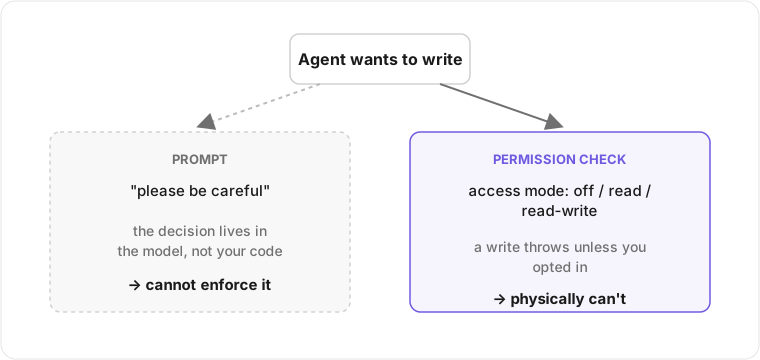
In Docket every MCP tool is gated behind an access mode read from config:
 off, read-only, or read-write. Read tools check one permission, write tools check another, and a write throws a typed error unless you explicitly opted into read-write. The default is off, so the agent is dead until you turn it on, and turning it on is a deliberate act in the app's settings rather than a flag buried in a sample config. The gate is a real branch in the tool's code path, not a sentence in a system prompt, which is the whole distinction the diagram above is drawing.
Past the gate, the design keeps narrowing what a write can do. An update touches only the fields you passed and leaves the rest of the record alone, so a partial edit cannot silently null out everything it did not mention. The MCP server shares one SQLite database with the running app, and instead of risking a corrupt write on a collision it sets a busy timeout that waits up to five seconds for the app to release its lock. And when the database isn't where it expects, the tool fails loudly: it tells you to launch the app first rather than helpfully creating an empty store and writing your agent's changes into a void nobody will ever read.
None of that is in the sample code, and the defaults you copy from a Claude Code or Cursor setup leave it out. The same instinct that makes you verify localisation in CI rather than by eye applies here: the boundary belongs in a mechanism that runs every time, not in a habit you have to remember. A skill or an MCP tool you write yourself, which Xcode 27 supports as custom tools you can add to the agent,[1:3]1. WWDC 2026, "Xcode, agents, and you" (session 259) - four agent modes (explore/build/refine/orchestrate), whole-project context, plan mode, self-validation via Build/Preview/Test, parallel sub-agent orchestration, custom tools/agents; providers Anthropic/OpenAI/Google (session 122) plus local MLX (session 232). is exactly where that mechanism lives.
Can I just run the agent against a local model and call it safe? 
No. Where the weights run and what the tool is allowed to do are two unrelated questions, and conflating them is how teams talk themselves out of building the boundary. A local MLX model[1:4]1. WWDC 2026, "Xcode, agents, and you" (session 259) - four agent modes (explore/build/refine/orchestrate), whole-project context, plan mode, self-validation via Build/Preview/Test, parallel sub-agent orchestration, custom tools/agents; providers Anthropic/OpenAI/Google (session 122) plus local MLX (session 232). keeps your code off someone else's server, which is a real privacy and compliance win. None of it touches the wrong write, because the wrong write comes from the tool's permissions and has nothing to do with where the model is hosted.
The local-model path is worth taking for what it buys. WWDC 2026 opened the on-device inference stack with Core AI, which runs models across CPU, GPU, and the Neural Engine on Apple Silicon with no server and no per-token cost.[3]3. WWDC 2026, "Meet Core AI" (session 324) - the on-device inference framework powering Apple Intelligence, running across CPU/GPU/ANE on Apple Silicon with no server and no per-token cost; integrates with Foundation Models via the LanguageModel protocol. You can back an Xcode agent with a model that never leaves the machine, and Foundation Models gives you Apple's on-device models behind the same LanguageModelSession interface. That changes the threat model around data exfiltration. It leaves the threat model around mutation exactly where it was: an agent that can call a write tool can make a write you didn't want, whether the tokens came from a datacentre or the chip in your laptop.
So the order of operations matters. Decide what the agent is permitted to touch and gate it in code first; choose where the model runs second. Gating the permissions is what prevents the deleted record. Picking a local model only keeps your source out of a training set. Both are worth doing, but only the first one is the bug this post is about.
How do I know the agent's work is right before I ship it? 
Treat agent output the way you'd treat a pull request from a fast contributor you don't fully trust yet: it gets reviewed by machines before it gets reviewed by you. The agent's self-validation against build and tests[1:5]1. WWDC 2026, "Xcode, agents, and you" (session 259) - four agent modes (explore/build/refine/orchestrate), whole-project context, plan mode, self-validation via Build/Preview/Test, parallel sub-agent orchestration, custom tools/agents; providers Anthropic/OpenAI/Google (session 122) plus local MLX (session 232). confirms the code runs. Whether it does what you meant, and whether a tool call left your data in the state you expected, are questions the build never answers.
What helps is tightening the loop the agent has to pass before its change counts. If your write tools enforce access modes and field-scoped updates, a misfired call throws instead of corrupting, and a thrown error is something CI and your tests can see. That converts a silent data bug into a loud failure, which is the only kind you can build a process around. Xcode 27's Organizer can even point a coding agent at its own metric regressions and generate recommendations from them,[4]4. WWDC 2026, "What's new in Xcode 27" (session 258) - Organizer redesign with new Storage and hitches metrics, Metric Goals versus peers and baseline, and "Generate Recommendations" backed by a coding agent. which is useful so long as the agent acting on those recommendations is running through tools that can refuse. An agent fixing a hitch metric is one bad write away from the same problem this whole post is about.
I keep coming back to mechanisms over prompts because a mechanism runs whether or not anyone remembers it. An agent that has already shipped code into your repo is a different job from one you're wiring up clean. If something is already in there, auditing what the agent actually built comes before you let it write again. And if the data it can reach is sensitive, the question of who and what may read or mutate it is an iOS security question rather than a tooling preference. The agent is the newest thing pointed at that data, and the oldest rules about guarding it still apply.
If you are wiring agents into a real iOS codebase and want the boundaries in before the first bad write, that is the AI dev workflows work I do. Send me the MCP setup or the Cursor plugin and I'll go through it for the tool calls that can reach your data today with nothing standing in the way.
WWDC 2026, "Xcode, agents, and you" (session 259) - four agent modes (explore/build/refine/orchestrate), whole-project context, plan mode, self-validation via Build/Preview/Test, parallel sub-agent orchestration, custom tools/agents; providers Anthropic/OpenAI/Google (session 122) plus local MLX (session 232). ↩︎ ↩︎ ↩︎ ↩︎ ↩︎ ↩︎
WWDC 2026, Platforms State of the Union (session 122) - Xcode agent plugins via skills, MCP, and the agent-client protocol (ACP); Figma and GitHub ship plugins. ↩︎
WWDC 2026, "Meet Core AI" (session 324) - the on-device inference framework powering Apple Intelligence, running across CPU/GPU/ANE on Apple Silicon with no server and no per-token cost; integrates with Foundation Models via the
LanguageModelprotocol. ↩︎WWDC 2026, "What's new in Xcode 27" (session 258) - Organizer redesign with new Storage and hitches metrics, Metric Goals versus peers and baseline, and "Generate Recommendations" backed by a coding agent. ↩︎