How to audit an iOS app that Cursor or Claude built before you ship it
An AI code audit on a Cursor- or Claude-built iOS app catches the silent bugs: a paywall any code path can unlock, secrets logged in release.
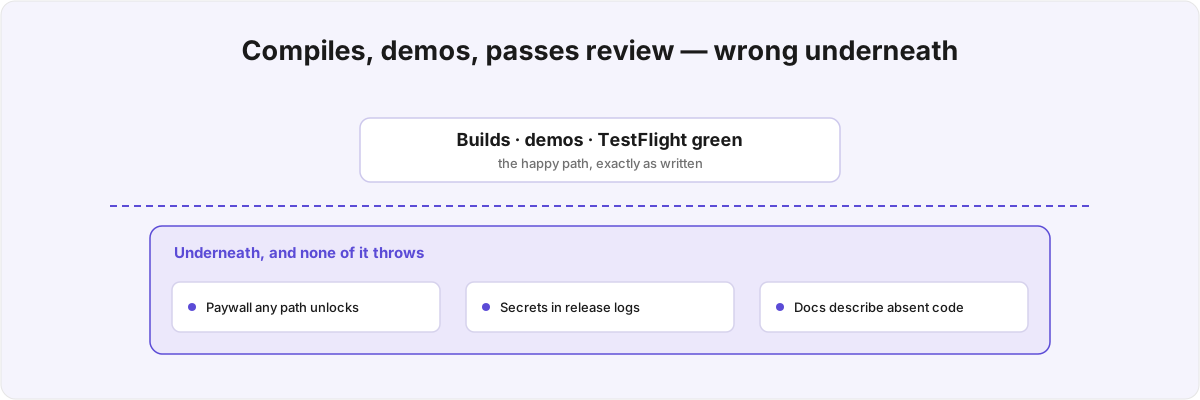
The app builds, the screens work, and TestFlight looks fine. Then you open the repo to onboard a real engineer and nothing lines up. An AI code audit on a Cursor- or Claude-built iOS app almost never turns up a crash, because the agent is good at the parts a compiler checks. What it turns up is a build that runs cleanly and is wrong underneath, and no test catches the wrongness because nothing ever throws.
What does an AI code audit on an iOS app look for? 
Not crashes. The failures you expect from AI-written Swift are the ones it rarely makes: it avoids force-unwraps and bad casts, because those show up the moment you run the thing and the agent was trained on a corpus where that code gets corrected. The bugs it leaves behind are the quiet ones, where the code does something plausible that happens to be the wrong thing.
Finding those is most of the job. A traditional review assumes a human wrote the code, so the mistakes cluster around the parts the author found hard or boring. Agent-written code inverts that: the hard parts are often fine, because the model has seen ten thousand correct examples of a URLSession call, and the defects collect in the seams where two correct-looking pieces meet and nobody checked that the contract between them holds. You are looking for code that compiles, runs, demos, and quietly does the wrong thing under a condition the demo never hits.
This breaks the usual review instinct. Reviewers trust the parts of a diff that look idiomatic, which is exactly what an agent produces by default, so the surface that normally signals "a careful person wrote this" is now free and you have to read for behaviour instead of style.
Why does an AI-built iOS app pass review and still break? 
Because review checks the happy path, and the happy path is the one thing an agent always gets right. Take subscriptions. The AI-generated iOS code I review keeps failing the same way: the agent wires up a real billing SDK, then gates premium features on a cached boolean instead of a live entitlement check. The whole app reads one flag from local storage, so any code path that ever writes that flag true unlocks the paid tier regardless of what the user bought.
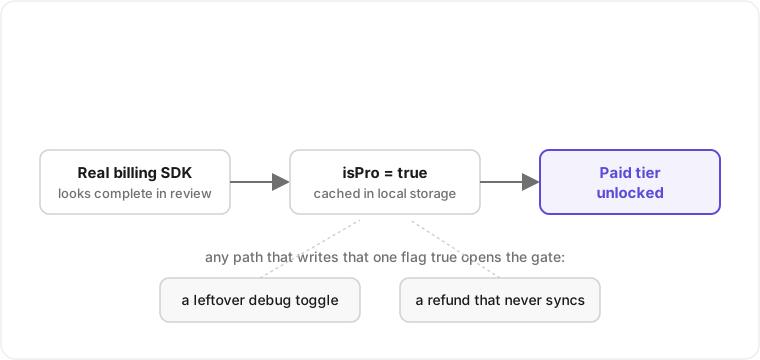
A leftover debug toggle, or a refund that never propagates back to that flag, is enough to open the gate. The integration looks complete in review because the purchase flow works end to end; the leak sits in the gap between being subscribed and the app remembering it. StoreKit 2 hands you a stream of current entitlements you are meant to read on demand,[1]1. StoreKit 2 exposes the user's active entitlements through Transaction.currentEntitlements, an async sequence meant to be read on demand against the App Store rather than snapshotted once and cached. See Apple's StoreKit documentation for Transaction and Transaction.currentEntitlements. and the agent instead snapshots it once and trusts that cache forever.
The same pattern repeats with logging and config. An agent adds a verbose log level to get a third-party SDK talking during development, leaves a // set this to error in production comment, and ships it on, so subscription state and entitlement keys stream to the device console in release builds where anyone with a cable and Console.app can read them.[2]2. Release builds still emit os_log / print output to the unified logging system, readable on a connected device via Console.app unless log privacy levels are set; see Apple's OSLog and unified logging documentation. Or it writes a sandbox-versus-production key split that resolves to the same key on both branches, so the separation you think you have is cosmetic. None of these throw, none of them fail a test, and the wrong fact stays invisible until someone goes looking. I wrote up the broader version, what surfaces when you grep a shipped binary for the things that should never be in it, in what an iOS security audit finds.
Why do the docs describe a codebase that isn't there? 
Because the agent writes the documentation and the implementation in the same breath, and only one of them gets compiled. The most expensive misses I find are documentation drift: a CLAUDE.md or README describing a formal versioned schema and a migration plan, and actual code that defines none of it.
The SwiftData case is the cleanest example. The docs promise versioned migrations with named stages; the data layer quietly leans on SwiftData's implicit lightweight migration instead.[3]3. SwiftData performs implicit lightweight migration for additive, inferable model changes; non-inferable changes require an explicit SchemaMigrationPlan with VersionedSchema stages. See Apple's SwiftData documentation for SchemaMigrationPlan and VersionedSchema. That works right up to the day a model change needs more than a column rename and the framework can't infer the mapping, at which point the app either refuses to open the store or silently drops data, and the migration plan that was supposed to handle it exists only as prose nobody runs. I lean on the same implicit migration on purpose in my own SwiftData apps like Layered . The difference is that the README doesn't claim otherwise, so the next person isn't planning around a safety net that was never built.
The matching trap is the integrity check that lies. The agent adds a startup routine described as "validates the persistent store on launch", and the routine returns success before it has inspected anything. An early return true, a try-catch that swallows the failure, a guard that reads the wrong condition. A corrupt store sails through the check that exists specifically to catch it, and the first time you learn the data is bad is when a user tells you. Docs are how the next engineer forms a mental model, so a robustness the code never implemented becomes a false assumption every later decision is built on. Reconciling the docs against the code tells a new hire which guarantees are real and which are aspirational, which is what they need on day one instead of a README that reads as fiction.
Is this the agent being lazy, or something structural? 
It is structural, and treating it as laziness leads you to the wrong fixes. These tools are reinforced toward output that satisfies the prompt and passes a glance, which is a different property from being correct. The two coincide on the happy path and diverge on the edge cases nobody put in the prompt.
That has a consequence for how you audit. Defects cluster wherever correctness depends on a fact outside the file the agent was editing, because the agent reasons and writes locally and falls down on anything that requires holding a system-wide invariant in mind.
It also means the cost of a finding has nothing to do with how the code looks. A wrong colour constant and a leaked signing detail are both one-line diffs that compile cleanly. What the audit gives you is triage: knowing which of fifty findings is cosmetic and which one leaks a credential or corrupts a store. On a large agent-written project that is mostly deciding what to ignore, because the volume of plausible-but-irrelevant findings is high enough to bury the two that matter.
How is auditing AI code different from a normal iOS code review? 
The unit of suspicion moves from the line to the contract. A normal review trusts idiomatic code and scrutinises the awkward bits, because awkward is where a tired human makes mistakes. Agent code is uniformly idiomatic, so that signal is dead, and you have to scrutinise the confident, clean, well-named code precisely because confidence is free to generate. The "this looks fine, move on" instinct is the one the failure mode exploits.
The second difference is App Review. An agent will happily produce a UI that ships a feature Apple's guidelines disallow in that context, because the guidelines aren't in its weights with anything like the fidelity of the Swift standard library. It does not know that requesting a permission you don't use, gating a previously free feature behind a new paywall, or mishandling account deletion are rejection triggers under the App Store Review Guidelines rather than style choices.[4]4. App Store Review Guideline 5.1.1 (data collection and permission requests), 3.1.2 (subscriptions), and 5.1.1(v) (account deletion) are common rejection triggers that an agent has no reliable model of; see Apple's App Store Review Guidelines. That gap costs you a submission cycle instead of a hotfix, and it's familiar from shipping in App Review's grey zones myself, which I wrote about in Apple's problem with bodies.
The third difference is that the architecture is usually real but shallow. Agents reach for the most-documented pattern, which for iOS is often SwiftUI with The Composable Architecture, and scaffold it competently. What they don't do is keep it coherent once the app grows past the scaffold: reducers that mutate state two ways, effects that aren't cancelled, dependencies passed by global instead of through the environment. Untangling that is a different job from a migration onto a clean TCA structure, and I read these fast because almost every app I ship is SwiftUI plus TCA, so I know where agents reliably cut the corner.
What can't an AI agent get right that an audit has to catch? 
Anything that depends on a fact the model can't see from inside the file: server-side entitlement state, the real distribution of user data, App Review's rulebook, the device's behaviour under load. Every finding above is one of those facts assumed away. Lean on something heavier like an on-device model and the agent will wire the API correctly yet run it in a way that hangs the UI on older hardware, because whether it belongs on-device at all is a judgement that lives outside the call site.
None of this is what a linter finds, and a rewrite throws away working code to chase it. To fix an AI-built iOS app you read the plausible codebase, find the handful of lines where plausible and correct diverged, prove which of them bite a real user, and hand back a map of what the docs claim against what the code does. If yours was written mostly by an agent and you want it checked before it has real users, that is the work I do.
StoreKit 2 exposes the user's active entitlements through
Transaction.currentEntitlements, an async sequence meant to be read on demand against the App Store rather than snapshotted once and cached. See Apple's StoreKit documentation forTransactionandTransaction.currentEntitlements. ↩︎Release builds still emit
os_log/printoutput to the unified logging system, readable on a connected device via Console.app unless log privacy levels are set; see Apple'sOSLogand unified logging documentation. ↩︎SwiftData performs implicit lightweight migration for additive, inferable model changes; non-inferable changes require an explicit
SchemaMigrationPlanwithVersionedSchemastages. See Apple's SwiftData documentation forSchemaMigrationPlanandVersionedSchema. ↩︎App Store Review Guideline 5.1.1 (data collection and permission requests), 3.1.2 (subscriptions), and 5.1.1(v) (account deletion) are common rejection triggers that an agent has no reliable model of; see Apple's App Store Review Guidelines. ↩︎