Why is my iOS app slow to launch, and how do I diagnose iOS app performance in Instruments?
Most iOS app performance problems trace back to the main thread waiting on work that should never have been on it.
The app feels fine on your phone and slow on a customer's. Most iOS app performance complaints start there: launch takes a beat too long, or a scroll stutters, or memory climbs until the system kills the app in the background and it cold-launches when the user comes back. You profile it, the numbers look reasonable, and you cannot find the thing that's wrong. The symptom and the cause usually sit in different places, and the device where the symptom shows up is rarely the one on your desk.
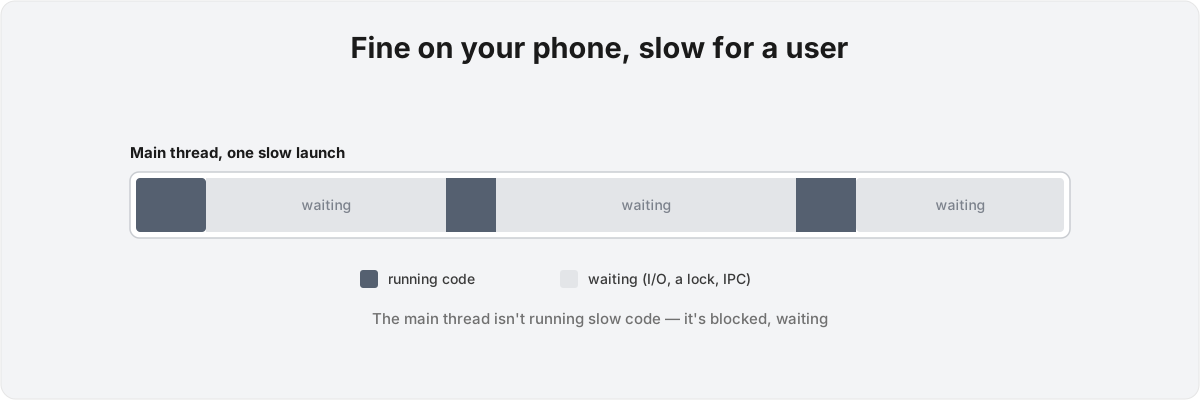
Why is my iOS app slow even though the profiler shows nothing expensive? Because the main thread is usually not running expensive code. It's waiting. The first thing to settle is whether the CPU is busy or idle during the stall, because that one fact decides everything you do next. Get it wrong and you spend a week optimising a function that was never the bottleneck.
Why does an iOS app feel slow when the code isn't? 
When an iOS app is slow, the instinct is to look for slow code, and usually the main thread is sitting blocked on something instead. Instruments 27 makes that the first question you answer. During a hang, the Time Profiler shows whether the CPU is busy or idle, and the two readings point to opposite fixes. High CPU means your code is too expensive and needs to be optimised, moved off the main thread, or both. Idle CPU means the thread is blocked on something like a file read or a lock, and no amount of optimising that function will help, because the function isn't running.[1]1. WWDC 2026 session 268, "Profile, fix, and verify: Improve app responsiveness with Instruments." During a hang, the Time Profiler distinguishes high CPU (code too slow - optimise or offload) from idle CPU (main thread blocked on I/O, a lock, or IPC - diagnose with System Trace). Includes the Swift Executors instrument for spotting accidental Main Actor work, Top Functions mode for diffuse hot functions, and the guidance to always profile a release build.
iOS launch time is the same trap concentrated into the worst possible moment. A synchronous disk write, a database opened on the main actor, a renderThumbnail-style function quietly inheriting the Main Actor and dragging rendering onto it: none of these show up as "slow" in isolation. They show up as a thread parked, waiting, while the user stares at a launch screen. The Swift Executors instrument exists because that accidental main-actor work is invisible in source - a function with no @MainActor annotation inherits it from a caller, and the executor track is the only place it becomes legible.
How do I tell a slow function from a blocked thread in Instruments? 
The single fastest way to tell them apart is to look at the CPU during the hang: busy means the code is too expensive, idle means the thread is blocked on something it's waiting for. That one branch decides which instrument you reach for and which fix is even possible.
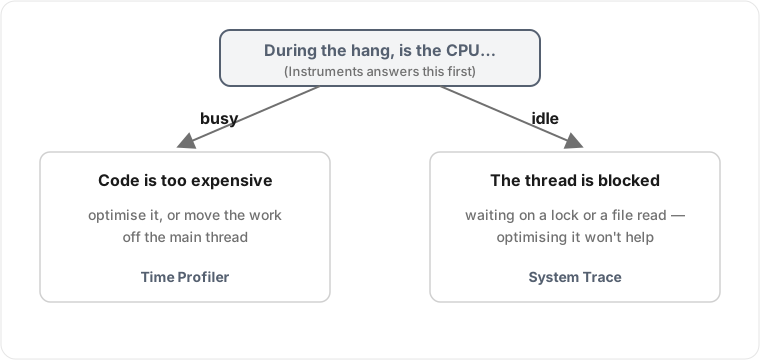
If the CPU is busy, the Time Profiler is the right tool, and the trap is reading the call tree the way it presents itself. An expensive function rarely sits in one fat node you can spot by eye; it's scattered across dozens of call sites - a Codable decode here, an any-existential boxing there - each cheap on its own and costly once you add them up. Top Functions mode merges those scattered nodes by self time, which is what surfaces the diffuse hot function the flame graph buries.
If the CPU is idle, the Time Profiler has almost nothing to tell you, because there are no samples to attribute when the thread isn't executing. That's a System Trace job: it shows the thread state transitions, when the thread went to sleep and what it was waiting on. The answer lives in the wait itself rather than the code around it, which is why intermittent hangs trace back to a lock held by a background task that itself got descheduled - the main thread waits on a thread that's waiting on the system.
One more thing decides whether any of this is real: the build. Instruments profiling against a debug build will lie to you. Whole-module optimisation, inlining, and bounds-check elision all change the shape of the trace, so a debug profile measures an app the user will never run. Profile a release build before you trust a single number.
Why does my app profile fine on my machine but stutter for users? 
The bug you can reproduce on your desk is rarely the one hurting users, because the conditions that produce it - old hardware, a year of accumulated data, a thermally throttled phone, an OS version you don't own - don't exist on your machine. Memory growth that triggers a background termination, jank that only appears on a device with fewer cores, a crash filed under one of the newer memory-exception categories: these live in the field, and a profiler that only sees your hardware never shows them to you.
That's what MetricKit is for, and in iOS 27 it's been rebuilt Swift-first. MetricManager replaces the old MXMetricManager and delivers async metricReports and diagnosticReports from real installs - CPU, memory, display and GPU metrics grouped by domain, plus diagnostics that now include a memory-exception category and a crash termination category telling you why the system killed the process.[2]2. WWDC 2026 session 222, "Meet the new MetricKit." MetricManager replaces MXMetricManager, exposing async metricReports and diagnosticReports grouped by domain (.cpu, .memory, .display, .gpu), with diagnostics that now include a memory-exception category and a crash termination category. Subscribe at launch and keep the subscriber alive. You subscribe at launch and keep the subscriber alive, and over days the field tells you which signatures are real for the people who paid for the app.
The trap underneath the field data is that it's anonymous and aggregate, so you can see that a cohort of devices terminates on launch without seeing which line did it. Bridging that signature back to a reproducible local case is the actual work, and it's why the new StateReporting framework matters: it lets you tag metric reports with your own app states, a sync running or a large import in progress, so a memory spike arrives labelled with what the app was doing, which is what lets you reproduce it on a device you own.[3]3. WWDC 2026 session 222. The StateReporting framework lets an app annotate MetricReport.stateEntries with its own state domains via the ReportableMetadata macro and StateReporter, so field metrics arrive tagged with what the app was doing - validated locally with the Points of Interest instrument. The same API carries through to Metal frame-rate metrics, so a game can read a dropped-frame report against the state that produced it.[4]4. WWDC 2026 session 388, covering Metal game performance with the same StateReporting API and MetricKit's new Metal frame-rate metric, so dropped-frame reports can be read against game context rather than a bare timestamp.
Does it matter that all of this depends on how the app is built? 
Every one of these answers is build-specific, and that constraint is doing real work rather than covering for vagueness. What you do about a blocked main thread has nothing to do with what you do about memory growth, and the right call for either depends on the concurrency model, where state lives, and what's on the main actor by accident. A generic "make it faster" pass doesn't exist; you need a specific diagnosis and a specific fix, and the diagnosis has to come first or the fix is a guess. The common failure is a team that decides launch is the problem and spends a week deferring initialisers, when the actual stall was a synchronous database open three screens in, on a device carrying more data than any of them had locally. Optimising the wrong half costs you the week and adds risk to code that was already correct.
Compute-heavy apps make the stakes concrete. I've shipped 12+ apps on this stack, including Notch , which runs Core ML on device to score shooting targets from a photo. That inference has to stay off the main thread or scrolling pays for it, but offloading it naively just trades a blocked main thread for a scheduling problem, as the model competes with the UI for cores. Moving it to a background queue isn't the fix on its own; the fix is which queue, at what priority, against what else was running, which you can only answer once you've read the trace. The same logic governs anything heavy a user can trigger mid-scroll, whether that's a decryption pass over an encrypted store or a large SwiftData fetch. Which approach you reach for depends on what the trace shows once the work is running on a loaded device, and the framework alone won't tell you.
When should I bring in an iOS performance consultant rather than keep profiling? 
Bring in help when you've confirmed what the bottleneck is but the fix keeps moving the problem somewhere else, or when the slowness only reproduces in the field and you can't pull it back to your desk. Those are the two cases where more profiling on your own hardware stops paying off, because the missing piece is knowing which of the things a trace shows you actually matters for your app's shape, not another trace.
The cost of guessing goes beyond the wasted week. Performance fixes touch hot paths and concurrency boundaries, exactly where a wrong move introduces a data race or a regression harder to catch than the slowness you started with. Instruments 27 builds the guardrail in with Run Comparisons: a baseline trace and an optimised trace in one document, so a change you believe made things faster has to prove it against the before, in red and green, rather than against your memory of how it used to feel.[5]5. WWDC 2026 session 268. Run Comparisons places a baseline trace and an optimised trace in a single Instruments document and shows the delta directly - red for regressions, green for improvements - so a claimed speedup is verified against the before rather than against recollection. Most "optimisations" I'm asked to review never measured the before.
I've spent more than a decade profiling and shipping iOS apps, most of them SwiftUI and The Composable Architecture, several featured by Apple, including FDA-regulated ones where a hang is a correctness bug rather than a polish problem. If your app is slow and the profiler isn't telling you why, bring me the trace and I'll tell you whether you're up against slow code or a blocked thread. Those need opposite fixes, and applying one to the other is the most common way I see a week disappear.
WWDC 2026 session 268, "Profile, fix, and verify: Improve app responsiveness with Instruments." During a hang, the Time Profiler distinguishes high CPU (code too slow - optimise or offload) from idle CPU (main thread blocked on I/O, a lock, or IPC - diagnose with System Trace). Includes the Swift Executors instrument for spotting accidental Main Actor work, Top Functions mode for diffuse hot functions, and the guidance to always profile a release build. ↩︎
WWDC 2026 session 222, "Meet the new MetricKit."
MetricManagerreplacesMXMetricManager, exposing asyncmetricReportsanddiagnosticReportsgrouped by domain (.cpu, .memory, .display, .gpu), with diagnostics that now include a memory-exception category and a crash termination category. Subscribe at launch and keep the subscriber alive. ↩︎WWDC 2026 session 222. The StateReporting framework lets an app annotate
MetricReport.stateEntrieswith its own state domains via theReportableMetadatamacro andStateReporter, so field metrics arrive tagged with what the app was doing - validated locally with the Points of Interest instrument. ↩︎WWDC 2026 session 388, covering Metal game performance with the same StateReporting API and MetricKit's new Metal frame-rate metric, so dropped-frame reports can be read against game context rather than a bare timestamp. ↩︎
WWDC 2026 session 268. Run Comparisons places a baseline trace and an optimised trace in a single Instruments document and shows the delta directly - red for regressions, green for improvements - so a claimed speedup is verified against the before rather than against recollection. ↩︎