A Core ML developer on why your model is accurate in testing but wrong in the shipped iOS app
A Core ML developer on why on-device ML drifts between the lab and the field, and why the fix is rarely the model itself.
Your model reports a high mAP in the notebook. You convert it to Core ML, run it on a test image, and the boxes land where they should. Then you ship it, and on-device ML on iOS starts behaving like a different model. As a Core ML developer this is the most common thing I get handed: detections drift off the objects, the counts come back too high, and older phones stutter while they think. Nothing about the weights changed.
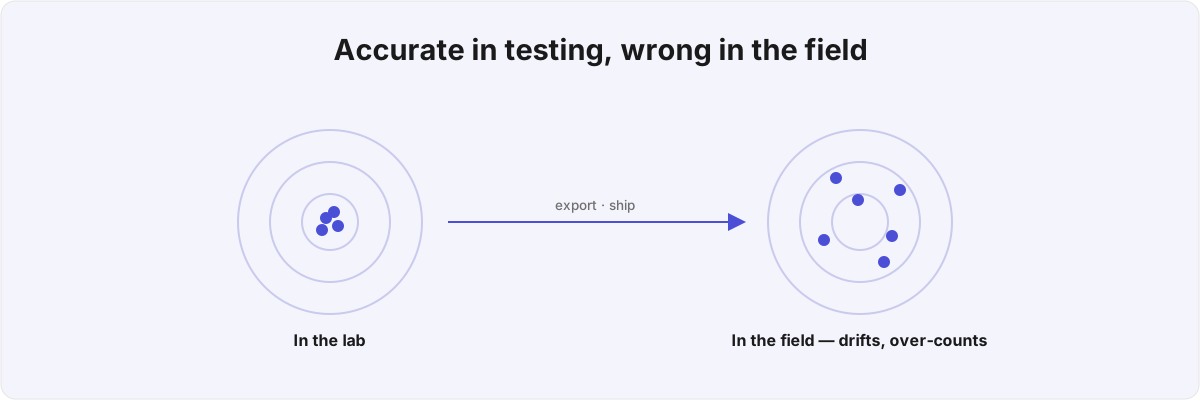
The model is usually the part that works. The accuracy number you trust came from a clean, curated test set running through PyTorch on a machine with no time budget. The shipped app feeds the same weights a camera buffer of unpredictable size and orientation, on a phone that wants the answer in 30 milliseconds and would rather not spin up the fans. Most of what people call a "model bug" is the gap between those two environments, and almost none of it is fixed by retraining. Here is where it tends to hide.
Why does a model that tests clean ship wrong? 
Almost always because the bug lives in the plumbing between the camera buffer and the array of observations, long after the inference itself has finished. The weights are deterministic. The code that resizes the input, reads back the output, and turns boxes into a result is where the variance creeps in, and it is exactly the code your notebook never exercised.
The clearest tell is that the failure is structured rather than random. A genuinely bad model is wrong in scattered, uncorrelated ways. A plumbing bug is wrong consistently: every box flipped on the same axis, every count inflated by roughly the same proportion, every slow frame on the same class of device. When the error has a shape to it, the surrounding pipeline is where I start. That single observation tells me, before I read any code, whether someone needs a data scientist or an iOS engineer, and those are not the same hire.
What breaks a Core ML pipeline between the lab and the field? 
A Core ML pipeline breaks in three predictable places, and none of them is the model itself: the coordinate space the boxes come back in, the way the image was resized before inference, and the confidence threshold nobody applied to the output.
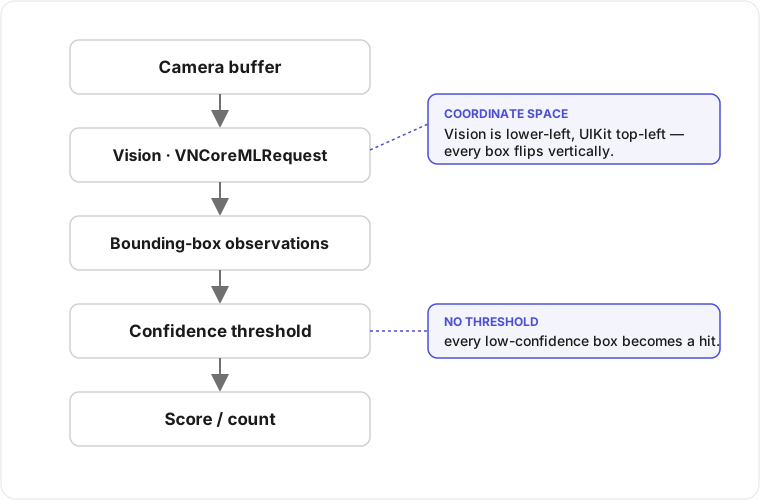
Vision returns bounding boxes in a normalized, lower-left origin coordinate space, while UIKit and most drawing code assume top-left.[1]1. Vision returns detections in a normalized coordinate system with a lower-left origin, while UIKit's origin is top-left - see Apple's Vision framework documentation for VNRecognizedObjectObservation and the VNImageRectForNormalizedRect helper. Get that conversion wrong and every box is flipped vertically, so the model is pointing at the right thing and the rectangle on screen lands somewhere else. It passes review because the demo image happens to be roughly symmetric, then surfaces the moment a real frame isn't.
Resizing is the next trap, and the most quietly destructive. A VNCoreMLRequest exposes an imageCropAndScaleOption, and the default does not match what most training pipelines do.[2]2. VNCoreMLRequest.imageCropAndScaleOption (.centerCrop, .scaleFit, .scaleFill) controls how the input image is fit to the model's expected size; mismatching it against the training-time preprocessing changes the input distribution at inference. See Apple's Core ML and Vision request documentation. If your model was trained on square centre-crops and you hand it a full-frame photo scaled to fit, the network sees stretched geometry it never saw in training. No amount of retraining fixes that, because the input distribution at inference no longer matches the input distribution at training. The accuracy didn't drop. The picture you're feeding the model changed shape.
Then there's the threshold nobody applies. A Core ML object detector emits a confidence for every box, including the ones it's barely sure about. If you read back the VNRecognizedObjectObservation array and score all of it, every uncertain guess becomes a real result. I hit this building Notch, my Core ML shot-scoring app: low-confidence detections were being counted as real hits, and the score came back too high. A better model wouldn't have helped. What fixed it was a threshold and a penalty for boxes that overlapped the printed scoring numerals, which the detector loves to mistake for holes. I wrote that whole pipeline up, training and all, in My Phone Replaced a Brass Plug. It's invisible in testing, because clean test images rarely throw off the marginal boxes that a phone pointed at a real target produces constantly.
Why is it slower on a real phone than in the simulator? 
Because the simulator runs your model on the Mac's CPU and GPU, while the device tries to route it to the Neural Engine and sometimes can't, falling back to a slower compute unit you never profiled. The latency you measured on a laptop is close to meaningless for an A-series or M-series chip making different scheduling decisions under a thermal and battery budget.
The lever here is MLModelConfiguration.computeUnits, and the default .all is not a guarantee.[3]3. MLModelConfiguration.computeUnits defaults to .all, which lets Core ML place ops across the Neural Engine, GPU, and CPU; unsupported ops force per-segment fallbacks. See Apple's Core ML MLModelConfiguration documentation. Core ML decides at load time which operations it can place on the Neural Engine, and any layer it can't - an unsupported op, an awkward tensor shape, a dynamic dimension - forces a fallback to GPU or CPU for that stretch of the graph, often with a copy between memory regions on each boundary. A model that looks fast in aggregate can spend most of its time shuffling tensors around the ops that didn't map cleanly. The second cost is the one people forget to budget for: the first inference after launch includes specialization and compilation for the specific device, which is why the very first frame is slow and every frame after it is fine. If you measure cold and report it as steady-state, you'll chase a regression that doesn't exist.
None of this shows up in a notebook because the notebook has no Neural Engine and no thermal ceiling. It shows up on a four-year-old iPhone in someone's hand, which is the benchmark that decides whether the feature ships. Keeping inference off the main thread so the UI doesn't hang while the model thinks is straightforward. Working out why a given layer won't accelerate takes someone who has shipped this before and read the Instruments trace to find the fallback.
Core ML vs Foundation Models: which one should run on device? 
Pick by the job: Core ML and Vision for finding things in pixels, Foundation Models for reasoning over text, and a server only when neither belongs on the device.
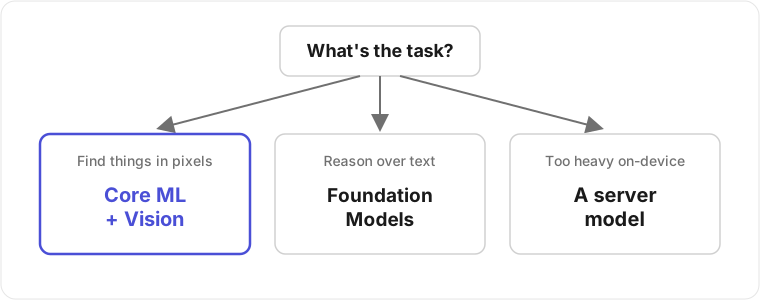
People compare them as if they were interchangeable, and they are different jobs. Foundation Models is a language model for text reasoning; the Vision framework on iOS paired with a Core ML detector is what you want for finding things in pixels. Reach for the heavy general model to do work a small specialist nails and you burn battery and latency for worse accuracy. The inverse mistake is just as expensive: bolting a hand-rolled classifier onto a problem that is really natural-language understanding, where Foundation Models would have given you a structured answer with no training data at all.
The line has blurred a little, which is worth knowing before you choose. Vision now exposes a tool layer that hands image work to a Foundation Models session - OCRTool for dense text and BarcodeReaderTool for codes - so "read the text in this photo and reason about it" is one pipeline now rather than two glued together.[4]4. WWDC 2026, session 237, "What's new in image understanding" - OCRTool and BarcodeReaderTool expose Vision image analysis as Foundation Models tools, taking an ImageReference resolved through the session. For the cases where Apple's own models aren't enough, WWDC 2026 opened a lower door: Core AI lets you bring your own model, convert it through coreai-torch to an .aimodel, and compress it with coreai-opt quantization before it ever touches a device.[5]5. WWDC 2026, session 324, "Meet Core AI" - bring-your-own-model via coreai-torch to an .aimodel, with coreai-opt compression (int4/int8 and palettization). Session 325, "Dive into Core AI model authoring and optimization," covers the optimization flow. And MLXLanguageModel runs larger language models on Apple Silicon and plugs into the same LanguageModelSession,[6]6. WWDC 2026, session 241, "What's new in Foundation Models" - MLXLanguageModel conforms to the Foundation Models LanguageModel protocol and backs a LanguageModelSession on Apple Silicon. which is the territory I was in for the on-device inference behind Am I a Bad Friend?. With more runtimes to choose from, there are more ways to pick one that's wrong for the job, and each new runtime brings its own lab-versus-field gaps. A big model carries a first-run specialization cost that looks, on a stopwatch, exactly like the cold-frame slowness Core ML has always had.
Choosing the architecture is rarely where the time goes. The data and the device are. A model trained on single, centred subjects falls apart on a busy frame; a model that fits in your test bundle may need Background Assets to download on first run because it bloats the binary past what the App Store will ship comfortably; and a feature that assumes Apple Intelligence hardware needs a sane fallback for the devices that don't have it. Each of those looks like an engineering choice and turns out to be a product one, which is where most of the time goes.
So is it a model problem or a code problem? 
It is a code problem far more often than the people handing it to me expect, and telling the two apart is the whole job of the diagnosis. If the same input produces a stable, repeatable wrong answer, the model is doing its job and something downstream is mangling the result. If the wrongness is genuinely scattered and uncorrelated with input geometry, lighting, or device, then it's worth looking at the weights, which is the last thing I check rather than the first.
I've shipped Core ML in production, including the detection pipeline in Notch , and I've done on-device work next door to it: health data on Epsy, and the reverse-engineering behind PureGym's unofficial Apple Wallet developer. If your model tests clean and ships wrong, send me the pipeline and I'll tell you whether you're looking at a model problem or a problem in the code around it. A flipped coordinate space and a genuinely bad set of weights take different people to fix, and knowing which one you have saves you a month spent on the other.
Vision returns detections in a normalized coordinate system with a lower-left origin, while UIKit's origin is top-left - see Apple's Vision framework documentation for
VNRecognizedObjectObservationand theVNImageRectForNormalizedRecthelper. ↩︎VNCoreMLRequest.imageCropAndScaleOption(.centerCrop,.scaleFit,.scaleFill) controls how the input image is fit to the model's expected size; mismatching it against the training-time preprocessing changes the input distribution at inference. See Apple's Core ML and Vision request documentation. ↩︎MLModelConfiguration.computeUnitsdefaults to.all, which lets Core ML place ops across the Neural Engine, GPU, and CPU; unsupported ops force per-segment fallbacks. See Apple's Core MLMLModelConfigurationdocumentation. ↩︎WWDC 2026, session 237, "What's new in image understanding" -
OCRToolandBarcodeReaderToolexpose Vision image analysis as Foundation Models tools, taking anImageReferenceresolved through the session. ↩︎WWDC 2026, session 324, "Meet Core AI" - bring-your-own-model via
coreai-torchto an.aimodel, withcoreai-optcompression (int4/int8 and palettization). Session 325, "Dive into Core AI model authoring and optimization," covers the optimization flow. ↩︎WWDC 2026, session 241, "What's new in Foundation Models" -
MLXLanguageModelconforms to the Foundation ModelsLanguageModelprotocol and backs aLanguageModelSessionon Apple Silicon. ↩︎