Why is the Family Controls API entitlement request stuck in review for my screen time app?
Why a working Family Controls API prototype stalls at the gated entitlement, and what Apple is deciding when it reviews a screen time app.
You wire up the Family Controls API against the development entitlement, the pickers work, you block an app in the simulator, and the demo is clean. Then you request the distribution entitlement so you can ship, and the request sits. Weeks pass. No rejection, no approval, and the launch date you set against a working prototype is now a guess. Plenty of teams get a screen time app running in development and only find out at this stage that Apple still has to decide whether they are allowed to ship it at all.
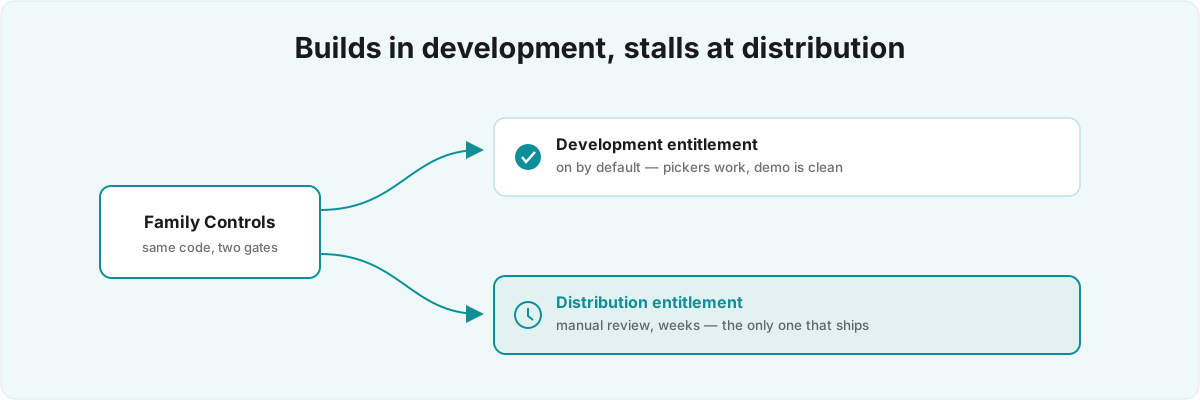
Why does a working Family Controls API build stall at the entitlement? Because the development entitlement and the distribution one are different things. The first is on by default in Xcode and lets anyone build. The second is a manual grant Apple reviews case by case, and it is the only one that lets you ship. A clean demo exercises the first entitlement and says nothing about the second. I get handed screen time apps at exactly this point, after the engineering looks done and before anyone realises the hard part was never the code.
Why is the distribution entitlement gated at all? 
The Family Controls entitlement is gated for distribution in a way almost nothing else on iOS is. The development version builds and runs without anyone at Apple looking, which is why a green prototype tells you so little: nobody has decided yet whether your use case is one they want a third party touching. That decision happens on a separate form, and the review is not about whether your code compiles. It is about whether an app that can shield other apps, see a child's usage, and override system controls should be yours to ship.
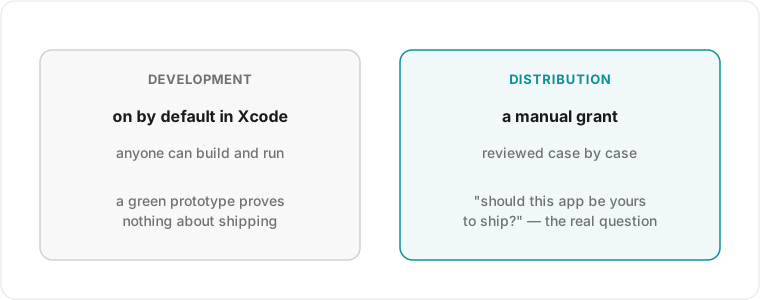
The gate exists because the capability is dangerous in the wrong hands. The same APIs that let a parent block TikTok on a child's phone would, pointed at an adult who did not consent, be spyware. Apple has no automated way to tell the two apart from your binary, so it reads your written justification instead, and it has turned this entitlement down for apps that look like productivity tools, MDM, or employee monitoring, anything that reads as watching an adult rather than a parent managing a child or a person managing themselves.[1]1. App Store Review Guideline 5.5 (Mobile Device Management) governs apps that install configuration profiles or manage other devices; Family Controls apps are repeatedly held to its intent - parental or institutional control, never covert monitoring of people who have not consented. What you write on that form, and what your App Store presence says around it, carries most of the weight.
The framework backs that suspicion up in code. The usage data behind a DeviceActivityReport is opaque to your own process by design: you can render it inside a system-provided report view, but you cannot read the numbers, copy them out, or send them to a server.[2]2. The DeviceActivityReport SwiftUI view renders usage inside a system-provided report extension that your process cannot read from; selections come back as opaque ApplicationToken, WebDomainToken, and ActivityCategoryToken values rather than bundle identifiers. See Apple's DeviceActivity and ManagedSettings framework documentation. It is the same problem as any app built around data the developer is not supposed to see, like the local-only discipline I had to enforce by hand in Silk , where the data is encrypted on-device and never leaves it. The difference with Family Controls is that the OS enforces the boundary for you, so a prototype that tries to read and export the activity data cannot work, and the attempt itself reads as intent: a reviewer who finds a code path structured to exfiltrate usage sees exactly the use case the gate exists to stop.
What does the authorization mode change? 
Most of the architecture follows from one early decision. AuthorizationCenter runs in two modes, individual and child, and that choice cascades into which APIs you may call, what a ManagedSettingsStore is allowed to shield, and whether you need a Family Sharing relationship for any of it to function.[3]3. AuthorizationCenter requests Family Controls authorization in either individual or child mode (FamilyControlsMember), and the mode determines which ManagedSettingsStore restrictions take effect and whether a Family Sharing relationship is required. See Apple's FamilyControls framework documentation. Treat it as a checkbox you can flip later, and you have built the whole app around an authorization mode it was never granted.
The individual mode is for an app that manages the device it runs on - a person setting limits on their own phone. The child mode reaches across a Family Sharing link to a child's device, and that is where almost all the real constraints live. Child authorization requires the account to actually be a child in an Apple Family, requires the parent to approve through a system prompt you do not control, and revokes itself the moment the family relationship changes. None of that surfaces in a single-device simulator run, because the simulator has no family and no parent on the other end. You demo the happy path of a setup that does not exist yet, and the assumptions baked into that demo are the ones that break first against a real family.
Pick the wrong mode early and the rebuild is not cosmetic. The shielding rules differ, the authorization flow differs, and the entitlement justification you submit differs, because Apple wants to know which of the two apps you are. An app that quietly assumes it can do child-style cross-device control while authorized only for the individual will fail silently in production and look, from the outside, like a flaky build rather than a design error.
Why does it work in the simulator but go silent on a real device? 
Because the blocking and the reporting do not run in your app. DeviceActivityMonitor and the report extension live in separate app extensions, outside your main process, with their own memory limits and no shared state you can lean on.[4]4. DeviceActivityMonitor runs in a DeviceActivityMonitorExtension - a separate, memory-constrained app extension the system launches and terminates around scheduled events, with no guaranteed in-memory state across launches. See Apple's DeviceActivity framework documentation. The prototype that worked did so because it never ran long enough for the OS to evict an extension and relaunch it cold.
This is the part that costs people the most time, so it is worth being precise. When a shield needs to apply, the system wakes your DeviceActivityMonitor extension, runs a tightly bounded slice of your code, and may kill it again immediately. Whatever you were holding in memory is gone on the next launch, so the extension has to reconstruct its entire state from disk every time it wakes, inside a memory budget far smaller than a foreground app's. A monitor that works in a five-minute demo and dies after a day in someone's pocket is almost always one that assumed it could keep state across launches it does not control.
The application tokens make this sharper. When a user picks apps to block, you never get bundle identifiers; you get opaque ApplicationToken values that are meaningless outside the framework and cannot be reconstructed from anything you store yourself.[2:1]2. The DeviceActivityReport SwiftUI view renders usage inside a system-provided report extension that your process cannot read from; selections come back as opaque ApplicationToken, WebDomainToken, and ActivityCategoryToken values rather than bundle identifiers. See Apple's DeviceActivity and ManagedSettings framework documentation. So the persistence story is not "save the bundle IDs and reload them" but "persist the opaque tokens correctly across a process the OS restarts at will, in an extension that cannot phone home," and that constraint shapes the data layer of the whole app. It is the same category of problem as keeping a background or extension-driven feature alive within its limits, except here the failure mode is silence rather than a crash you can symbolicate: the shield does not apply, and you find out because a parent emails you that their kid is still on Instagram.
How do I word the entitlement request so a reviewer reads a parental tool? 
State plainly that the app manages a person's own device or a parent's control over a child's, name the Family Sharing relationship you rely on, and make clear you neither read nor transmit the usage data. Treat the request as a written argument and not a feature list. The reviewer is deciding whether this is a parental or self-control tool, or surveillance dressed up as one.
The traps here are about adjacency. An app that mentions "monitoring," "tracking employees," or "seeing what they're doing" pattern-matches to the use cases the gate exists to refuse, even when the actual feature is a wholesome parental limit. The framing problem is the same one I wrote about in Apple's Problem with Bodies: App Review keys on what your words imply as much as on what your code does, and a metadata field you can barely see decides which bucket you land in. Where the screen time app also touches a child's health or wellbeing data, the healthkit and medical-data rules start to overlap with this one.
The other half is the privacy substance underneath the wording. Because the framework hands you opaque tokens and an unreadable report, the honest architecture has no server-side copy of anyone's usage, and you should be able to say so and have your code back it up.[5]5. App Store Review Guideline 5.1.1 (Data Collection and Storage) requires that data collection be transparent and minimal; combined with the framework's opaque-token design, the defensible architecture for a screen time app keeps usage data on-device and out of any server you control. A reviewer who reads a justification claiming local-only handling, then finds a network call shipping activity data off-device, has every reason to treat the whole submission as bad-faith. Getting this right is reverse-engineering an underspecified bar from the outside, which is most of what I do at this layer; the PureGym Wallet work was the same shape of problem, inferring a system's real rules from how it behaves rather than from what the docs claim.
Whether your use case clears the gate, which authorization mode to build around, how to persist state through an extension the OS restarts at will, and how to word the request so a reviewer reads a parental tool are all judgement calls, and each one costs weeks if you get it wrong. If you have a screen time app blocked on the Family Controls entitlement and a launch date you set before you knew the gate existed, that is the work I take on.
App Store Review Guideline 5.5 (Mobile Device Management) governs apps that install configuration profiles or manage other devices; Family Controls apps are repeatedly held to its intent - parental or institutional control, never covert monitoring of people who have not consented. ↩︎
The
DeviceActivityReportSwiftUI view renders usage inside a system-provided report extension that your process cannot read from; selections come back as opaqueApplicationToken,WebDomainToken, andActivityCategoryTokenvalues rather than bundle identifiers. See Apple's DeviceActivity and ManagedSettings framework documentation. ↩︎ ↩︎AuthorizationCenterrequests Family Controls authorization in either individual or child mode (FamilyControlsMember), and the mode determines whichManagedSettingsStorerestrictions take effect and whether a Family Sharing relationship is required. See Apple's FamilyControls framework documentation. ↩︎DeviceActivityMonitorruns in aDeviceActivityMonitorExtension- a separate, memory-constrained app extension the system launches and terminates around scheduled events, with no guaranteed in-memory state across launches. See Apple's DeviceActivity framework documentation. ↩︎App Store Review Guideline 5.1.1 (Data Collection and Storage) requires that data collection be transparent and minimal; combined with the framework's opaque-token design, the defensible architecture for a screen time app keeps usage data on-device and out of any server you control. ↩︎