iOS 27 readiness: why does my Apple Intelligence feature work in the demo but vanish for real users?
iOS 27 readiness is the plumbing nobody demos: availability gating, App Intents that read entitlement, and Liquid Glass on only half the screens.
The demo went fine. Your Apple Intelligence feature answered, a couple of App Intents fired from Siri, and the iOS 27 readiness work felt done. Then a teammate opens the build on an older iPhone and the AI section is gone. On another device the new Siri reads back a number that was meant for paying users. A few screens picked up Liquid Glass and the rest look like last year. None of it showed up in the demo, which ran on one new phone with the model already on disk.
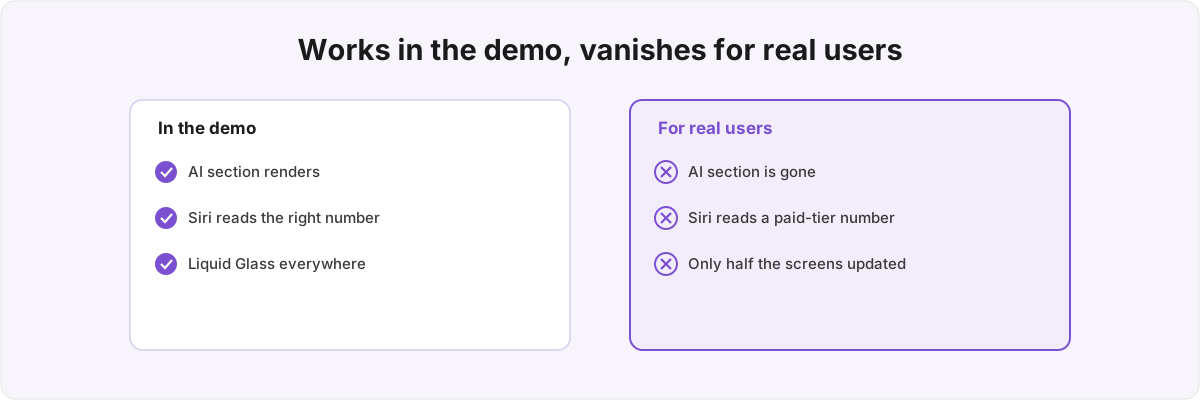
Almost none of what breaks is in the AI code itself. It is in the state around the model, the entitlement the assistant reads, and the half-finished design pass. A demo hides all three, because a demo is one machine with every variable pinned in your favour. The work of getting an app ready for iOS 27 is mostly making those variables visible and giving each one an honest answer.
Why does the feature work for me and break for them? 
Because the AI code runs fine; the state around it does not. An on-device model is not a switch you flip. The device can be too old for the silicon. Apple Intelligence can be switched off in Settings. The model can still be downloading, the locale can be unsupported, the prompt can run past the context window, or a request can trip the safety guardrail. SystemLanguageModel.availability reports several of those before you open a session, and a LanguageModelError surfaces the rest at runtime. iOS 27 still runs on fairly old hardware, but the Apple Intelligence silicon does not reach that far, so each state needs its own honest fallback or the feature is invisible to a large slice of the base the OS still supports.
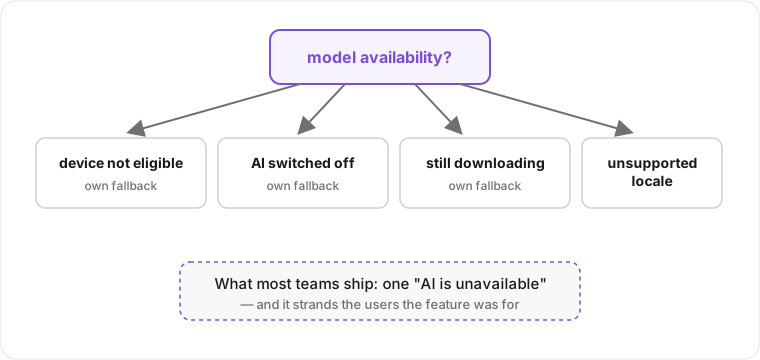
These are not interchangeable failures, and that is the point. A device that is not eligible will never run the model, so the right answer is to remove the entry point entirely and not advertise a feature the hardware cannot deliver. Apple Intelligence switched off in Settings is recoverable, and the right answer is a prompt that points at the setting. A model still downloading is temporary, and the honest answer is a progress state that retries rather than an error screen. An unsupported locale is a hard no for now, and pretending otherwise produces confident output in the wrong language. Collapse all four into one generic "AI is unavailable" string and you have technically handled the error while still shipping a worse product than the one you demoed. The eligible user whose model is mid-download then sees the same dead end as the user on a four-year-old phone. On the demo device none of these branches is ever exercised, because the model is already on disk, the setting is already on, and the locale is yours.
iOS 27 then adds a layer most teams walk straight into. The new LanguageModel protocol lets one LanguageModelSession swap between the on-device SystemLanguageModel and PrivateCloudComputeLanguageModel for heavier prompts, behind a uniform LanguageModelError and a usage value reported in tokens.[1]1. WWDC 2026 session 339, "Bring an LLM provider to the Foundation Models framework" - the provider-agnostic LanguageModel protocol, with SystemLanguageModel and PrivateCloudComputeLanguageModel conforming, a uniform LanguageModelError, per-request ContextOptions, and a usage property reporting token counts. Useful on a tight window or a weaker device, but it is another branch in the fallback tree, and the answer you get back depends on which model replied. The on-device model was also rebuilt this cycle and now takes image input through the prompt builder, so a feature that worked on text alone can start sending pixels and quietly spend a different token budget than the one you measured. The usage property exists precisely so you can see that budget; most teams never read it until a context-window overflow shows up as a LanguageModelError in front of a user.
How do I keep App Intents from leaking a paid feature to a free account? 
Mirror the entitlement somewhere the intent can read without loading your purchase runtime, and never let an intent decide who is allowed to run it by reaching across an actor boundary at call time. An App Intent that reads an isProUser flag by reaching into your StoreKit runtime will either stall while that runtime spins up out of process, or return a default value and hand a premium action to a free account. The intent runs in a different execution context from the app that owns the entitlement, and the demo never exercises the gap because there the app is already running and the flag is already warm.
iOS 27 raises the stakes on that gate. Siri in this cycle does three new things through App Intents: it finds content by answering over an AppEntity, takes action by running your intents, and understands on-screen context.[2]2. WWDC 2026 session 240, "Build intelligent Siri experiences with App Schemas" - AppEntity conforming to an AppSchema, IndexedEntity with indexingKey for the system semantic index, and the three Siri powers (find content, take action, understand on-screen context). To do the first one well your entities conform to an AppSchema and adopt IndexedEntity so they land in the system semantic index, which means the assistant can now reason over your data instead of only running a single intent you handed it. The reasoning that makes the feature good is the same reach that exposes your data. An entity that surfaces a value through Siri surfaces it on whatever device and whatever account the assistant is invoked from, and Shortcuts now persists and syncs entity storage across devices, so an entity needs a stable cross-device identifier rather than a per-device one.[3]3. WWDC 2026 session 310, "What's new in Shortcuts" - the Use Model action reasons over AppEntitys, and Storage persists data between runs and syncs across devices, so entities need a stable cross-device identifier. A wrong gate on a single intent leaks one action; a wrong gate on an indexed entity leaks everything the assistant can ask about it.
The security model tightened to match. Intents that adopt a schema inherit risk metadata automatically, so the system runs risk-based confirmations for destructive or shared-content actions, and authenticationPolicy with .requiresAuthentication blocks risky intents on a locked device. Schema defaults are deliberately strict, and you are only allowed to override them to be stricter; trying to weaken one is a build error.[4]4. WWDC 2026 session 347, "Secure your app: mitigate risks to agentic features" - schema-derived risk metadata driving risk-based contextual confirmations, and authenticationPolicy (.requiresAuthentication) blocking risky intents on a locked device; schema defaults are overridable only to be stricter. That is a good default, but it also means a free-text parameter, like the label on a timer, is treated as an injection vector, and your fallback for a blocked-while-locked intent has to be a real state and not a crash. None of this is visible on an unlocked demo phone signed into a paying account.
Did Liquid Glass actually land, or just on the screens I happened to open? 
Usually just on the screens you happened to open, and the untouched ones now look stale beside them. Liquid Glass is a design system rather than a single API, so adopting it is a per-screen pass rather than one flag. The screens you skipped do not throw an error; they just sit there looking like last year's app next to the ones you finished. Xcode 27 removed the opt-out, so the system styling is no longer something you defer to next quarter; the choice is to do the pass deliberately or to ship a half-glass app by accident.[5]5. WWDC 2026 sessions 122 (SOTU recap) and 251 ("Communicate your brand identity on iOS") - the opt-out removed in Xcode 27, and the UI-layer / content-layer split that moves tint into the content area so Liquid Glass picks it up dynamically.
The mechanism that catches teams is where the colour goes. The brand guidance this cycle separates a UI layer - navigation and chrome, which you keep native so Liquid Glass can treat it - from a content layer that carries your brand. Move tint and colour into the content and scroll area and the glass picks it up dynamically; leave a hard-tinted custom navigation bar in place and you fight the system instead of riding it. There is a performance tail to this too: Xcode 27's Organizer added a hitches metric specifically for Liquid Glass and SwiftUI, because the new material is not free to render, and a screen that scrolls fine on the newest phone can drop frames on the older hardware iOS 27 still supports. Adopting the look without watching that metric is how you trade a stale screen for a janky one. If this is the part you want done properly rather than half-done, that is Liquid Glass adoption as its own piece of work.
How do I actually test something that only breaks on a device that isn't mine? 
You reproduce the user's machine instead of trusting yours, and you run the intents out of process the way Siri does, not inside a unit test that imports your app. The reason the demo lied is that it ran on one environment; the fix is to stop having one environment. Xcode 27's Device Hub lets you swap the data container and mirror appearance, text size, and locale onto a real device or simulator, which is the difference between guessing why a config bug happens and reproducing it on purpose.[6]6. WWDC 2026 sessions 260 ("Get the most out of Device Hub" - data-container swap and mirrored appearance/text-size/locale to reproduce config bugs) and 243 ("Debug & profile agentic experiences with the Foundation Models Instrument"). That covers the availability branches: you can put the app on a device with Apple Intelligence switched off, or a locale you do not support, without owning four phones.
For the App Intents side, AppIntentsTesting runs your intents out of process, on-device, in an XCUITest bundle, addressed by string without importing the app. That is the only way to test what Siri actually sees, because your in-process code only knows what it thinks it exposes. The same cycle shipped a Foundation Models Instrument that shows the instruction and inference lanes, token usage, and time-to-first-token, and it catches a specific silent failure: a tool the model tried to call that was not in your toolset, which otherwise just looks like the model declining to do its job.[7]7. WWDC 2026 sessions 295 ("Validate your App Intents adoption with AppIntentsTesting" - out-of-process, on-device, addressed by string) and 243 (the Foundation Models Instrument's instruction/inference lanes and detection of a tool called that was not in the toolset). These are the tools that make the invisible states visible. They do not write the fallbacks for you, and knowing they exist is not the same as having wired your particular app through all of them.
I ran into every one of these shipping Metrics, which runs Foundation Models on device and exposes its numbers through App Intents to Siri and through WidgetKit on the Home Screen. The entitlement that stalled across an actor boundary, the session I had to type-erase under a version gate, the screens I thought were on Liquid Glass until I opened them on an older phone: each one cost me real debugging in a shipping app rather than a line skimmed in a release note. The reverse-engineering and PassKit work behind PureGym's Apple Wallet pass taught me the same lesson on different hardware. Both times the bug lived in a state the demo machine had quietly pinned and the user's machine had not.
If your Apple Intelligence app compiles clean but you cannot tell what the feature does on a real Siri request, whether your App Intents integration leaks anything on a locked device, or how far the Liquid Glass adoption actually reached, that is the iOS 27 readiness work I do. It pairs naturally with a closer look at the model layer itself (Foundation Models) or the entitlement and locked-device behaviour (an iOS security audit) when that is where the trouble actually sits. Send me the project and tell me which device it broke on.
WWDC 2026 session 339, "Bring an LLM provider to the Foundation Models framework" - the provider-agnostic
LanguageModelprotocol, withSystemLanguageModelandPrivateCloudComputeLanguageModelconforming, a uniformLanguageModelError, per-requestContextOptions, and ausageproperty reporting token counts. ↩︎WWDC 2026 session 240, "Build intelligent Siri experiences with App Schemas" -
AppEntityconforming to anAppSchema,IndexedEntitywithindexingKeyfor the system semantic index, and the three Siri powers (find content, take action, understand on-screen context). ↩︎WWDC 2026 session 310, "What's new in Shortcuts" - the Use Model action reasons over
AppEntitys, and Storage persists data between runs and syncs across devices, so entities need a stable cross-device identifier. ↩︎WWDC 2026 session 347, "Secure your app: mitigate risks to agentic features" - schema-derived risk metadata driving risk-based contextual confirmations, and
authenticationPolicy(.requiresAuthentication) blocking risky intents on a locked device; schema defaults are overridable only to be stricter. ↩︎WWDC 2026 sessions 122 (SOTU recap) and 251 ("Communicate your brand identity on iOS") - the opt-out removed in Xcode 27, and the UI-layer / content-layer split that moves tint into the content area so Liquid Glass picks it up dynamically. ↩︎
WWDC 2026 sessions 260 ("Get the most out of Device Hub" - data-container swap and mirrored appearance/text-size/locale to reproduce config bugs) and 243 ("Debug & profile agentic experiences with the Foundation Models Instrument"). ↩︎
WWDC 2026 sessions 295 ("Validate your App Intents adoption with AppIntentsTesting" - out-of-process, on-device, addressed by string) and 243 (the Foundation Models Instrument's instruction/inference lanes and detection of a tool called that was not in the toolset). ↩︎