Why my App Intents don't show up in the new Siri, Shortcuts, or Spotlight
App intents that compile but never surface in the new Siri usually trip over the system's run-mode and phrase-matching rules, with no error to chase.
You wrote the app intents, they compile, and the demo works once. Then a tester says the new Siri can't find the action, the shortcut they saved last week throws "Unable to run shortcut," and the result that should appear in Spotlight opens the wrong screen instead of showing a snippet. Nothing crashed. There's no error in the log. The app intents are just not where users look for them.
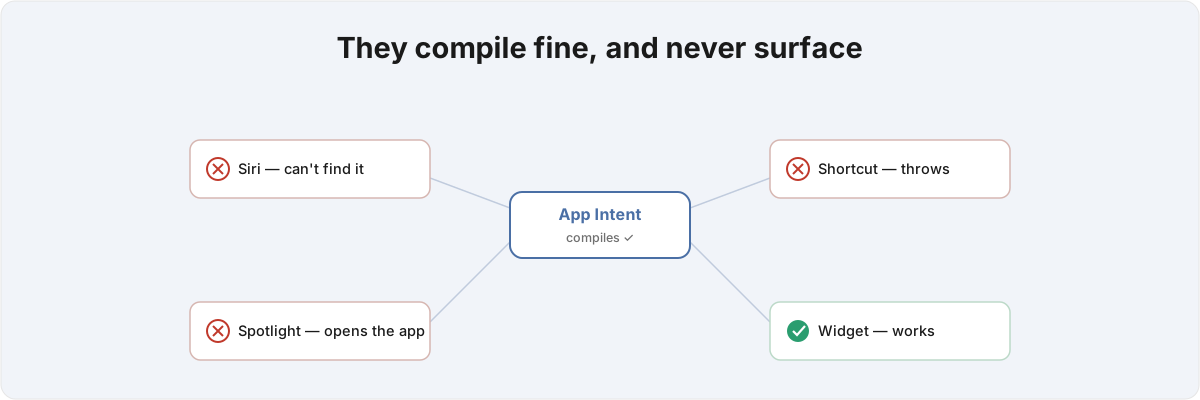
So why does a clean build go missing? App Intents doesn't behave like an API you call into; it behaves like a set of system rules you have to satisfy exactly, and missing one of them doesn't throw. The compiler checks that your Swift is valid. It can't check whether you satisfied the registration, phrasing, indexing, and confirmation contracts the system enforces at runtime. Pass the compiler and fail one of those, and you get silence.
Why don't my app intents show up in the new Siri? 
A voice intent that should run while your app is suspended has to be set up so the system never tries to foreground it. Get the run mode wrong and you get "Unable to run shortcut" with nothing in the log to explain it. In the iOS 27 model an intent declares where it runs through ExecutionTargets, and an intent meant to run in the background has to keep its perform() off the main actor.[1]1. WWDC 2026 session 345, "Discover new capabilities in the App Intents framework" - ExecutionTargets (main app / appIntentsExtension / widgetKitExtension) controls where an intent runs; an intent meant to run in the background keeps perform() off the main actor. The moment you pin the body to @MainActor, usually by reaching for a piece of state that's main-actor isolated, the system has to bring the app to the foreground to satisfy that isolation, and a suspended app can't be foregrounded silently. The intent that worked in the demo, where the app happened to be open, fails the instant it runs cold. The logic inside the intent is correct. The fix is moving the work onto an actor the system can run while the app stays suspended.
The Siri phrase parser is the second wall, and it's stricter than the documentation lets on. App Shortcuts require every phrase to contain the application-name token, so a phrase that reads naturally to you ("how is Murmur doing today") never matches unless the app's name is in it.[2]2. WWDC 2026 session 310, "What's new in Shortcuts" - App Shortcut phrases must contain the application-name token; the Use Model action reasons over AppEntity properties. Worse, when a parameter in a phrase is backed by an EnumerableEntityQuery, the system materialises one concrete phrase per entity at install time. With a handful of tracked items and a couple of date ranges, a single phrase template silently expands into twenty near-duplicate shortcuts, and the one a user actually says gets buried under variants the parser ranks ahead of it. When the transcript is noisy and doesn't line up to an enumerated value cleanly, you need an EntityStringQuery fallback doing fuzzy matching, or resolution comes back empty and Siri falls through to a web search.
I hit every one of these building Metrics, which answers App Store Connect questions through Siri on top of App Intents, WidgetKit, and Apple's Foundation Models. The phrasing alone took several rounds: the app's name is "Metrics," so "show me my metrics in Metrics" reads as a stutter, and the trick is to shape phrases where the app name lands as the noun the user is asking for rather than a tacked-on suffix.
Why does one entity work in the widget but not in Siri? 
Because the same AppEntity is being asked to satisfy four different surfaces, and each surface enforces a rule the others don't. One model backs Siri, Shortcuts, Spotlight, and your widgets, but the run mode that makes Siri happy, the phrase parser that makes Shortcuts happy, the indexing that makes Spotlight happy, and the entity query that makes a widget's app-picker happy are four separate contracts hanging off one type.
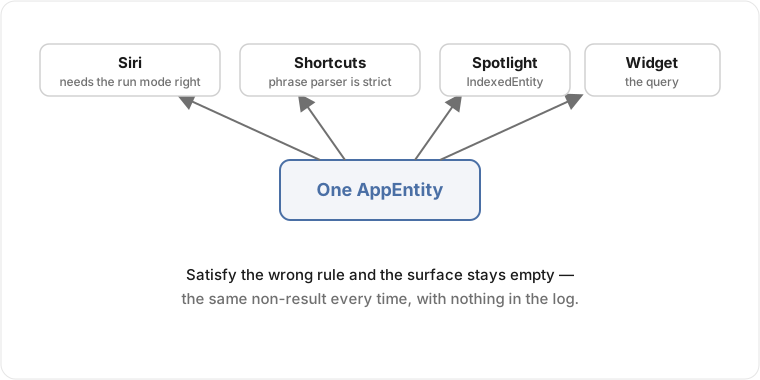
The trap that costs the most time lives in the entity query that WidgetKit shares with Siri. When iOS reloads a saved widget configuration, it walks the persisted IDs back through your query's lookup method to rebuild the selected entities. If that method returns fewer entities than the IDs it was handed, which is what a cache miss for even one ID during an extension cold-start produces, the system reads the whole selection as invalid and silently drops it. A user who picked three apps opens their home screen to an empty picker, and nothing logged an error, because from the system's point of view nothing went wrong: a query returned a short array and it acted on it. Holding the configuration together across a cold start means handling the IDs the cache can't resolve yet rather than dropping them, and that handling isn't in the sample code. You learn you need it after the bug report.
This is also why a clean refactor of the entity can take down a feature that looked fine. Expose rich properties so the Shortcuts Use Model action and the iOS 27 Siri can reason over your content,[3]3. WWDC 2026 session 310, "What's new in Shortcuts" - Storage syncs entities across devices, so entities need a stable cross-device identifier, and the model transcript ("Show Content") reveals the exact entity representation the model saw. and a query that misbehaves on a cold start now misbehaves everywhere at once.
Why does my intent open the app instead of a Spotlight snippet? 
Because the system routes a Spotlight tap to whichever intent claims the tapped entity, and claiming it correctly depends on conventions the sample code doesn't spell out. In the iOS 27 model you conform an entity to IndexedEntity and push it into the system semantic index with .indexAppEntities, so a tap can route through an OpenIntent, return ProvidesDialog, and render a SwiftUI snippet via ShowsSnippetView instead of cold-launching the app.[4]4. WWDC 2026 session 343, "Explore advanced App Intents features for Siri and Apple Intelligence" - IndexedEntity with .indexAppEntities on CSSearchableIndex, OpenIntent, ProvidesDialog, and ShowsSnippetView SwiftUI snippets. Get the conventions wrong and the tap opens the app every time, and the snippet you built never shows.
Most of what bites here is in how the OpenIntent is declared and whether the system is allowed to keep the app suspended on the tap. Miss one of those conditions and the tap foregrounds the app, the launch pre-empts the snippet, and you get the same "it just opens the app" symptom with nothing announcing which condition you missed. An older Core Spotlight item can also sit in the same index and win the tap ahead of your indexed entity, so something a previous version left behind quietly out-ranks the new behaviour.
There's a subtler failure that isn't about routing at all. Apple's sales data lags by a day, so an intent that reads "today" against a literal last-24-hours window returns zeros at every hour. The query is written correctly and still gives the user the wrong answer, while the in-app dashboard shows real numbers the whole time because it defaults to a wider window. That class of bug never shows up in a unit test; it shows up as a user saying the feature is broken when the code is doing exactly what you told it to.
How do I tell a real App Intents bug from a missing system rule? 
You run the intent in isolation, away from the app, and watch where the surface diverges from the code. The AppIntentsTesting framework runs intents out of process on the device by string, without importing the app, so you can drive an intent the way Siri would and assert on the result. There's a defined ladder for it: validate in AppIntentsTesting first, then Shortcuts, then Spotlight, then Siri, because each rung adds one more system contract on top of the last.[5]5. WWDC 2026 session 295, "Validate your App Intents adoption with AppIntentsTesting" - out-of-process on-device integration tests via IntentDefinitions(bundleIdentifier:), and the AppIntentsTesting → Shortcuts → Spotlight → Siri validation ladder. When an intent passes in isolation but fails one rung up, the gap between those two rungs is the system rule you haven't satisfied yet, and your perform() is doing its job.
The other half is risk metadata, which the new Siri enforces silently. An intent that adopts a system schema inherits a risk profile automatically and the system runs contextual confirmations based on it; authenticationPolicy then decides whether the intent is allowed to run at all on a locked device, and schema defaults are stricter than you'd set by hand.[6]6. WWDC 2026 session 347, "Secure your app: mitigate risks to agentic features" - schema-inherited risk metadata, risk-based contextual confirmations, and authenticationPolicy (.requiresAuthentication) gating risky intents on a locked device. A free-text parameter such as a timer label is treated as an injection vector and can trip a confirmation you never wrote. So an intent that runs instantly on your unlocked phone can stall behind an authentication prompt on a tester's locked one, and the difference is policy you inherited rather than code you can see. If you've shipped anything that has to behave under App Review's scrutiny of system integrations, this is the same shape of problem: real rules the system enforces, with nothing written down until you trip one.
None of these is a bug in your code. They are undocumented edges in how the new Siri, Shortcuts, and Spotlight resolve and rank intents, and most only show up once the integration runs on a real device against a real set of entities, often after a cold start or on a locked screen.
If your shortcuts on iOS build fine but never reach the surfaces users check, that's the App Intents and Siri work I do. Send me the intent file and a description of what's not appearing, and I can usually name the rule you're hitting before I open the project.
WWDC 2026 session 345, "Discover new capabilities in the App Intents framework" -
ExecutionTargets(main app / appIntentsExtension / widgetKitExtension) controls where an intent runs; an intent meant to run in the background keepsperform()off the main actor. ↩︎WWDC 2026 session 310, "What's new in Shortcuts" - App Shortcut phrases must contain the application-name token; the Use Model action reasons over
AppEntityproperties. ↩︎WWDC 2026 session 310, "What's new in Shortcuts" - Storage syncs entities across devices, so entities need a stable cross-device identifier, and the model transcript ("Show Content") reveals the exact entity representation the model saw. ↩︎
WWDC 2026 session 343, "Explore advanced App Intents features for Siri and Apple Intelligence" -
IndexedEntitywith.indexAppEntitiesonCSSearchableIndex,OpenIntent,ProvidesDialog, andShowsSnippetViewSwiftUI snippets. ↩︎WWDC 2026 session 295, "Validate your App Intents adoption with AppIntentsTesting" - out-of-process on-device integration tests via
IntentDefinitions(bundleIdentifier:), and the AppIntentsTesting → Shortcuts → Spotlight → Siri validation ladder. ↩︎WWDC 2026 session 347, "Secure your app: mitigate risks to agentic features" - schema-inherited risk metadata, risk-based contextual confirmations, and
authenticationPolicy(.requiresAuthentication) gating risky intents on a locked device. ↩︎